Chapter 16
Macros
A macro is a name for a group of lines. Once the group is defined, the name can be used like an instruction, and TATARA replaces each use with the lines of the group. The result of one use is called an expansion.
The system macro of chapter 14 is one: system _STROUT is replaced by ld c,_STROUT and call BDOS. A macro is not a subroutine. A subroutine exists once in the program and is reached with call; a macro’s lines are put into the program again at every use. A macro saves typing, not bytes.
This chapter describes how to define a macro, how to pass it values, and the directives that are used inside one. REPT, IRP and IRPC, which repeat lines without a name, are in chapter 17; they follow the same rules for arguments, LOCAL and EXITM.
16.1 Defining and using a macro
A macro is defined with MACRO, which is preceded by the name of the macro and followed by the names of its parameters, separated by commas. The lines that follow are its body, and ENDM ends it:
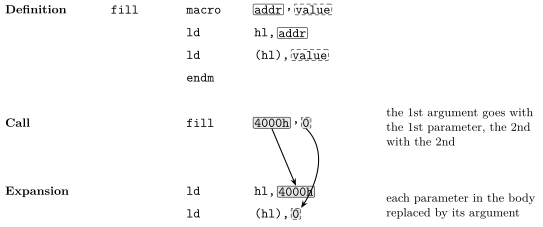
fill            macro   addr,value
                ld      hl,addr
                ld      (hl),value
                endm
As with EQU, the name is written without a colon (chapter 12). The definition produces no bytes; TATARA only stores the body. A macro must be defined before its first use.
To use the macro, write its name as if it were an instruction, followed by the arguments: the values its parameters stand for in this use. TATARA replaces each parameter in the body with the matching argument, the first argument for the first parameter, the second for the second (figure 16.1).
The listing shows each use followed by its expansion, with the generated lines marked +:
                                                fill    4000h,0
  0000'   21 00 40        +                     ld      hl,4000h
  0003'   36 00           +                     ld      (hl),0
                                                fill    4001h,0ffh
  0005'   21 01 40        +                     ld      hl,4001h
  0008'   36 FF           +                     ld      (hl),0ffh
Chapter 18 describes how to show less of an expansion in the listing, or none of it.
16.2 Arguments
The arguments of a use are separated by commas. Blanks before an argument are not part of it.
- An argument that is missing is empty. The parameter is then replaced by nothing, and the body has to allow for that: with db 0,b in the body, an empty b leaves db 0,, which TATARA refuses. IFB and IFNB (section 16.6) test for it.
- Arguments beyond the last parameter are ignored, as in M80.
- An argument that holds a comma is written between angle brackets, which are removed: <7,8> is one argument, 7,8.
- ! before a character makes it part of the argument whatever it is, such as a > or a comma that would otherwise end the argument, or a semicolon that would otherwise start a comment. A semicolon between angle brackets is part of the argument too.
This macro puts its first argument in a DB, and its second in another if there is one:
show            macro   a,b
                db      a
                ifnb    <b>
                db      b
                endif
                endm
In these uses, show 3 leaves b empty, the 6 in show 4,5,6 is ignored, <7,8> is one argument, and ’!>’ passes a string holding >:
                                                show    3
  0002'   03              +                     db      3
                                                show    4,5,6
  0003'   04              +                     db      4
  0004'   05              +                     db      5
                                                show    <7,8>,9
  0005'   07 08           +                     db      7,8
  0007'   09              +                     db      9
                                                show    '!>',10
  0008'   3E              +                     db      '>'
  0009'   0A              +                     db      10
An argument is text, not a value: five*2 is passed as the six characters five*2. A % in front of an argument passes its value instead, written as a decimal number. With a body of db ’&x’ (the & is explained in the next section), the first use below passes the text and the second its value:
                                                show    five*2
  0000'   66 69 76 65     +                     db      'five*2'
  0004'   2A 32           +
                                                show    %five*2
  0006'   31 30           +                     db      '10'
The value must be one TATARA already knows, as for IF (chapter 15).
16.3 Joining text with &
A parameter is replaced only where its name stands as a word of its own. To join it to other text, put & between them: lab&n with the argument 1 becomes lab1. The & itself disappears.
Inside a string, a parameter is not replaced at all unless it is joined with &. In the string ’n’, the n is just a letter; in ’&n’, it is the parameter:
label           macro   n
lab&n:          db      'n'
                db      '&n'
                endm
                                                label   1
  0000'   6E              +     lab1:           db      'n'
  0001'   31              +                     db      '1'
16.4 Comments in a body
A comment that starts with ; is kept in the body and appears in every expansion. One that starts with ;; is dropped when the macro is defined, so it is seen in the definition only. Use ;; for notes about how the macro works, which would only repeat themselves in the listing:
note            macro
                nop             ; kept
                nop             ;; dropped
                endm
                                                note
  0000'   00              +                     nop             ; kept
  0001'   00              +                     nop
16.5 LOCAL
A macro that defines a label can be used only once, because a second use defines the label again (chapter 12):
wait            macro   n
                ld      b,n
loop:           djnz    loop
                endm
LOCALNO.AS(4): ERROR: this name already has a value.
    in wait, called from LOCALNO.AS(8)
LOCAL, followed by one or more names, solves this. In each expansion, TATARA replaces those names with new ones, ??0000, ??0001 and so on, a different one each time:
wait            macro   n
                local   loop
                ld      b,n
loop:           djnz    loop
                endm
                                                wait    10
  0000'   06 0A           +                     ld      b,10
  0002'   10 FE           +     ??0000:         djnz    ??0000
                                                wait    20
  0004'   06 14           +                     ld      b,20
  0006'   10 FE           +     ??0001:         djnz    ??0001
The generated names are ordinary labels, and appear in the symbol table. Do not use names that start with ?? for labels of your own. LOCAL lines must come first in the body, before any other line; otherwise TATARA stops with LOCAL must come before the macro body.
16.6 EXITM
EXITM ends the expansion at once: the lines of the body after it are not used. It is used inside a conditional, so that the macro stops early in some cases. This macro does nothing when it is given no argument:
put             macro   x
                ifb     <x>
                exitm
                endif
                db      x
                endm
                                                put     1
  0000'   01              +                     db      1
                                                put
                                                put     3
  0001'   03              +                     db      3
This is where the text tests of chapter 15 are useful. IFB and IFNB ask whether an argument was given, and IFIDN and IFDIF compare an argument with a fixed text, such as a register name. The conditionals that EXITM leaves open inside the macro are closed with it.
16.7 Macros inside macros
A macro’s body can use another macro, and can define one:
byte            macro   x
                db      x
                endm
pair            macro   x,y
                byte    x
                byte    y
                endm
maker           macro   name,val
name            macro
                db      val
                endm
                endm
Here pair 1,2 produces db 1 and db 2 through byte. maker three,3 produces no bytes, but defines a macro called three, and three then produces db 3. A MACRO line in a body is only text until the body is expanded, and each ENDM belongs to the innermost MACRO.
A macro can also use itself. It then needs a condition that stops it, as in this macro, which counts down to zero:
down            macro   n
                db      n
                if      n gt 0
                down    %n-1
                endif
                endm
                                                down    3
  0000'   03              +                     db      3
  0001'   02              +                     db      2
  0002'   01              +                     db      1
  0003'   00              +                     db      0
Expansions inside expansions, together with include files, can be 16 deep. Without a condition to stop it, a macro that uses itself reaches that limit, and TATARA stops with sources nested too deeply.
A macro can be defined again, and the new definition replaces the old one from that line on. The system macro depends on this: each module that includes MSXDOS.INC defines it again (chapter 14).
16.8 Upper and lower case
Macro names follow the same rule as other names: without /C, PUT uses the macro put; with /C, it does not, and TATARA stops with not a directive, a macro or an instruction. (chapter 7).
Parameter names are matched ignoring case in both modes, as in M80: a parameter val is replaced wherever the body says val, VAL or Val.
16.9 Messages
Table 16.1 lists the messages about macros, each with the line that causes it.
Line |
Message |
macro with no name before it |
MACRO without a name. |
a macro name of 65 characters |
a macro name may be at most 64 characters. |
put: macro |
EQU, DEFL and MACRO take a name, not a label. |
a macro with 17 parameters |
too many macro parameters. |
bad macro a„b |
bad macro parameter list. |
| macro definition not closed by ENDM. |
|
| ENDM without a macro definition. |
|
| LOCAL must come before the macro body. |
|
| EXITM outside a macro or repeat block. |
|
a macro that uses itself with no end |
sources nested too deeply. |
When a line in an expansion causes an error, the message names the line of the body, in the file where the macro was defined, and the line below it says which macro it was and where it was used:
ERRIN.AS(4): ERROR: not a form this instruction has.
    in bad, called from ERRIN.AS(8)
Chapter 20 describes these trails in full.