Chapter 18
The listing
A listing shows what TATARA made of the source: each line as it was written, with the address it was assembled at and the bytes it produced. It is where to look when a program does not do what the source seems to say, or when a line takes more room than expected.
Chapter 5 describes how to ask for one. A listing goes to the file named third on the command line or, when there is none, to the screen with /P. /L puts the address and the bytes in front of each line; without it, a listing holds only the source. This chapter describes listings made with /L. To see one on the screen instead of in a file, give both options:
tatara /l /p modes.as
The rest of the chapter describes what a listing line holds, how the listing is divided into pages, and the directives with which a source decides what the listing shows.
18.1 A listing line
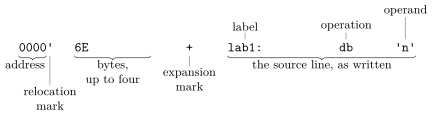
Figure 18.1 shows the columns of a listing line. The address comes first, then the bytes, then the source line, unchanged.
This source uses one example of each kind of line:
                extrn   far
five            equ     5
                aseg
                org     4000h
abs:            nop
                cseg
code:           ld      hl,data
                call    far
                db      1,2,3,4,5,6,7,8,9
only:
                dseg
data:           ds      2
                end
                                                extrn   far
  0005                          five            equ     5
                                                aseg
                                                org     4000h
  4000    00                    abs:            nop
                                                cseg
  0000'   21 00 00              code:           ld      hl,data
  0003'   CD 00 00                              call    far
  0006'   01 02 03 04                           db      1,2,3,4,5,6,7,8,9
  000A'   05 06 07 08
  000E'   09
  000F'                         only:
                                                dseg
  0000'                         data:           ds      2
                                                end
- The address is where the line was assembled, in hexadecimal. A line that produces no bytes but defines a label, such as only: and data: ds 2, shows the address the label was given. On an EQU line, the address column shows the value of the name instead.
- The relocation mark, an apostrophe, follows an address that is relocatable: an offset in the code or the data segment, which TANREN finishes (chapter 10). An address in the absolute segment, such as 4000h, has no mark. The mark is the same for code and data.
- The bytes are the ones the line produced, in the order they are in memory, up to four on a line. A line that produces more continues on the lines below it, which show only the address and the bytes: the DB of nine bytes takes three lines.
- The source line follows, as it was written.
Lines that produce nothing and define nothing, such as EXTRN, ASEG and ORG, have the address and bytes columns empty.
When an operand is relocatable or external, the bytes are the ones the object file holds before TANREN finishes them: the offset of data in its segment, 0000h, and zeros for the external name far. The listing does not mark these bytes. M80’s listing shows such an operand as one 16-bit value followed by a mark, 0000" or 0000*; TATARA shows each byte, in memory order, and no mark.
A line that comes from a macro expansion or a repeat block has a + in the column before the source line (chapter 16).
18.2 Pages
A listing is divided into pages. Each page starts with a page heading: a line with the title, the name and version of TATARA, the date and the page number, then a line for the subtitle and a blank line. Every page after the first starts with a form feed, so that a printer starts a new sheet. By default a page holds 56 lines of the source.
Three directives control the pages:
- TITLE text sets the title, which appears at the left of the page heading.
- SUBTTL text sets the subtitle, which appears on the line under the page heading.
- PAGE starts a new page after its own line. PAGE n sets the length of a page to n lines and starts a new page too. The count is the whole page, four lines of which go to the page heading, so page 12 leaves eight lines for the source. n must be from 10 to 255. M80’s *EJECT and $EJECT, written in column 1, are other names for PAGE without a count.
TATARA keeps the first 28 characters of a title or a subtitle, and drops the rest.
This source sets a title and a subtitle, makes the pages short, and starts a new page for its second part:
                title   Page test
                subttl  First part
                page    12
                cseg
                db      1
                db      2
                ...
                db      10
                subttl  Second part
                page
                db      11
                end
Page test       Tatara v1.2.0   30-Sep-26       PAGE    1


                                                title   Page test
                                                subttl  First part
                                                page    12
Page test     Tatara v1.2.0   30-Sep-26       PAGE    1-1
First part

                                                cseg
  0000'   01                                    db      1
  0001'   02                                    db      2
  0002'   03                                    db      3
  0003'   04                                    db      4
  0004'   05                                    db      5
  0005'   06                                    db      6
  0006'   07                                    db      7
Page test     Tatara v1.2.0   30-Sep-26       PAGE    1-2
First part

  0007'   08                                    db      8
  0008'   09                                    db      9
  0009'   0A                                    db      10
                                                subttl  Second part
                                                page
Page test     Tatara v1.2.0   30-Sep-26       PAGE    1-3
Second part

  000A'   0B                                    db      11
                                                end
The headings after the first sit two columns further left because each starts with the form feed, which takes no room on the page. The listing shows these points:
- The first page already has the title, although the TITLE line comes after its heading. TATARA keeps the title from the first pass (chapter 15), so the first page shows the last title in the source. After that, each page shows the title in force when it starts. A source with one TITLE, at the top, has it on every page.
- A subtitle is not kept from the first pass, and appears only from the page after the SUBTTL line. To start a new part of the source on a new page with its own subtitle, write SUBTTL and then PAGE, as above.
- The page numbers go 1, 1-1, 1-2, 1-3. A page started by PAGE, or by the previous page filling up, is numbered as a part of the same page: its main number stays and the number after the dash goes up.
The main number goes up at a form feed in the source. A line holding only a form feed (character 0Ch) starts a new page, numbered 2, 3 and so on, and the pages after it are 2-1, 2-2 and so on. This is how M80 numbers pages, and it lets a source divided by form feeds be printed with one main number for each part.
18.2.1 The last page
A listing written to a file ends with a page numbered S, which lists the names of the macros the source defined and then the symbols, with their values:
        Tatara v1.2.0   30-Sep-26       PAGE    S


Macros:

Symbols:
000F'   only            0000*   far             0000'   data
4000    abs             0000'   code            0005    five
This is the listing of the source in section 18.1, which defines no macros. A relocatable value has the apostrophe it has in a listing line. An external name has no value in this module, and is shown as 0000*. The symbol table is described in chapter 19. A listing printed on the screen with /P does not have this page.
18.3 Turning the listing off and on
.XLIST turns the listing off, and .LIST turns it back on. The lines between them are assembled as usual, but not listed. .XLIST itself is not listed either; .LIST is:
                cseg
                db      1
                .xlist
                db      2
                db      3
                .list
                db      4
                end
                                                cseg
  0000'   01                                    db      1
                                                .list
  0003'   04                                    db      4
                                                end
The address goes from 0000h to 0003h, because the two lines that are not listed still produced a byte each.
The most common use is around an include file, whose lines are otherwise all in the listing (chapter 5):
                .xlist
                include msxdos.inc
                .list
18.4 Macro expansions
Three directives decide how much of a macro expansion or a repeat block the listing shows. Each applies from its own line on, until another of the three.
- .XALL, the default, lists the lines of an expansion that produce bytes.
- .LALL lists every line of an expansion, including the lines of a conditional that are not assembled.
- .SALL lists no line of an expansion. The line that uses the macro is listed with a +, to show that it stands for an expansion.
This macro has a line that is never assembled. The source uses it once in each mode:
two             macro
                db      1
                if      0
                db      2
                endif
                ld      a,3
                endm
                cseg
                two
                .lall
                two
                .sall
                two
                .xall
                two
                end
                                                two
  0000'   01              +                     db      1
  0001'   3E 03           +                     ld      a,3
                                                .lall
                                                two
  0003'   01              +                     db      1
                          +                     if      0
                          +                     db      2
                          +                     endif
  0004'   3E 03           +                     ld      a,3
                                                .sall
                          +                     two
                                                .xall
                                                two
  0009'   01              +                     db      1
  000A'   3E 03           +                     ld      a,3
Under .LALL, the lines that were not assembled have no address. Under .SALL, the only signs of the expansion are the + on the line that uses the macro and the addresses, which go from 0004h to 0009h: the expansion’s three bytes are at 0006h to 0008h.
18.5 Lines not assembled
Three more directives decide whether the listing shows the lines that a conditional (chapter 15) leaves out:
- .LFCOND, the default, lists them, with no address.
- .SFCOND leaves them out. The IF, ELSE and ENDIF lines are still listed.
- .TFCOND changes from one of these to the other: after .LFCOND it works as .SFCOND, and after .SFCOND as .LFCOND.
This source has five conditionals that are false, one before each directive and one after the last:
                cseg
                if      0
                db      1
                endif
                .sfcond
                if      0
                db      2
                endif
                .lfcond
                if      0
                db      3
                endif
                .tfcond
                if      0
                db      4
                endif
                .tfcond
                if      0
                db      5
                endif
                end
                                                cseg
                                                if      0
                                                db      1
                                                endif
                                                .sfcond
                                                if      0
                                                endif
                                                .lfcond
                                                if      0
                                                db      3
                                                endif
                                                .tfcond
                                                if      0
                                                endif
                                                .tfcond
                                                if      0
                                                db      5
                                                endif
                                                end
The lines of the second and fourth conditionals are not listed. M80 lists this source in the same way.
18.6 Messages
A PAGE length outside 10 to 255 stops TATARA with this message:
PAGEBAD.AS(1): ERROR: a PAGE length must be 10 to 255.
The other listing directives take no operand, or take any text, and have no messages of their own.