Chapter 23
Where TANREN looks for object files
An object file named without a drive or a directory, such as SUB.TRO, can be in more than one place. This chapter describes where TANREN looks for it, how the TANREN environment variable fits in, and where the output file goes when an object file is found somewhere other than the current directory.
TANREN looks for object files the way TATARA looks for include files (chapter 13), with the link file in the place of the file that holds the INCLUDE line.
23.1 Three places
TANREN looks for an object file in three places, in this order, and uses the first one it finds:
- the directory of the link file that names it, if it was named in a link file (chapter 22);
- the current directory;
- each directory named in the TANREN environment variable, from left to right.
Figure 23.1 shows the three places for one command. PROG.LNK, in BUILD, names main and sub. TANREN takes SUB.TRO from BUILD, beside the link file, and never reaches the copies in the current directory or in TATARA\LIB. There is no MAIN.TRO in BUILD, so it takes the one in the current directory.
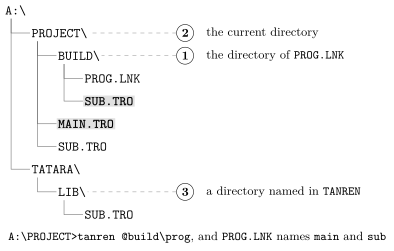
The directory of the link file comes first so that a program’s own object files, kept beside its link file, always win over other files of the same name. An object file named on the command line, and not in a link file, starts with the second place.
The examples in this chapter use several copies of SUB.TRO, each made from a source that prints the directory it was in, so that running the program shows which copy TANREN used. With the link file PROG.LNK in LNK, and a SUB.TRO beside it:
A:\>tanren @lnk\prog /o:lnk.com
...
2 modules, 16 records, ends at EOF.
Wrote LNK.COM, 0100-0123 (36 bytes), entry 0100.
A:\>lnk
SUB.TRO from LNK
23.2 The TANREN environment variable
TANREN names directories where TANREN looks for object files that are not in the first two places, such as a directory of modules that several programs share. It works like TATARA (section 13.3): several directories are separated by semicolons and tried from left to right, and a \ at the end of each is not needed, but does no harm. In AUTOEXEC.BAT or another batch file:
set tanren=a:\tatara\lib;a:\project\mod
At the prompt, the value goes between quotation marks, as in chapter 3.
Without TANREN, an object file that is not in the first two places is not found:
A:\>tanren main sub
...
ERROR: cannot open SUB.TRO
With TANREN set to the directory that holds it, the same command links:
A:\>tanren main sub
...
2 modules, 16 records, ends at EOF.
Wrote MAIN.COM, 0100-0123 (36 bytes), entry 0100.
A:\>main
SUB.TRO from LIB
A directory in TANREN that does not exist is passed over, and the next one is tried.
TANREN is the last of the three places. A SUB.TRO in the current directory is used before the one in a TANREN directory:
A:\>tanren main sub /o:cur.com
...
Wrote CUR.COM, 0100-0135 (54 bytes), entry 0100.
A:\>cur
SUB.TRO from the current directory
23.3 Paths in the name
A name that starts with a drive, such as B:SUB, or with \, such as \PROJECT\SUB, is an absolute path. TANREN opens it as written and looks nowhere else, even if TANREN names a directory that holds the file:
A:\>tanren main b:sub /o:drv.com
...
ERROR: cannot open B:SUB.TRO
Any other name is a relative path, and is looked for in each of the three places in turn. tanren main lib\sub finds LIB\SUB.TRO under the current directory, with no TANREN at all.
23.4 Where the output file goes
Without /O:, the output file is named after the first object file, with .com (chapter 21), and it goes into the directory where that object file was found. When the first object file comes from a TANREN directory or from the link file’s directory, so does the output file:
A:\>tanren sub main
...
WARNING: LIB\SUB.COM is entered at 0100, not at 0109.
2 modules, 16 records, ends at EOF.
Wrote LIB\SUB.COM, 0100-0123 (36 bytes), entry 0109.
Here SUB.TRO was found through TANREN, in LIB, and SUB.COM was written there too, not in the current directory. The summary line shows the path. (The warning is about the order of the modules, as in section 21.1: SUB.TRO is named first.) To be sure where the output file goes, name it with /O:.
23.5 Messages
Table 23.1 lists the messages about finding object files.
Message |
Meaning |
ERROR: cannot open NAME.TRO |
The object file is in none of the three places, or not where an absolute path says. The name is shown as it was written, in capitals. |
ERROR: the TANREN variable is too long. |