Chapter 13
Including files
A source can take lines from another file with INCLUDE. This chapter describes what INCLUDE does, where TATARA looks for the file, how the TATARA environment variable fits in, and what happens when files include other files.
13.1 INCLUDE
include followed by a filename reads that file at that point, as if its lines had been typed there instead of the INCLUDE line. When the file ends, TATARA carries on with the line after the INCLUDE. A file read this way is called an include file.
; DEFS.INC - two names for MAIN.AS
five            equ     5
ten             equ     10
                include defs.inc        ; the names
                cseg
                ld      a,five
                ld      b,ten
                ret
                end
The listing shows the lines of DEFS.INC where the INCLUDE line was, with nothing to mark them as coming from another file. The INCLUDE line itself is not listed:
A:\>tatara /l /p main.as
Tatara MSX Macro-Assembler v1.2.0
Copyright (C) 2026 Javier Lavandeira
https://tatara.tools

        Tatara v1.2.0   29-Sep-26       PAGE    1


                                ; DEFS.INC - two names for MAIN.AS
  0005                          five            equ     5
  000A                          ten             equ     10
                                                cseg
  0000'   3E 05                                 ld      a,five
  0002'   06 0A                                 ld      b,ten
  0004'   C9                                    ret
                                                end
ended at MAIN.AS(6)
The filename is written as it is, with its extension and without quotation marks, and a comment can follow it. TATARA adds nothing to the name: include defs looks for a file called DEFS, and include "defs.inc" for a file whose name starts with a quotation mark. Both stop TATARA with cannot open.
An include file can hold anything a source can: names, code, data, macros, and INCLUDE lines of its own. The usual use is a set of names that several programs share, such as the names of the MSX-DOS2 functions in MSXDOS.INC (chapter 14).
Including a file is not the same as linking a module (chapter 2). An include file becomes part of the source that includes it, and of the one object file TATARA makes from it. Its names are that source’s names, and nothing needs PUBLIC or EXTRN.
13.2 Where TATARA looks
A filename with no drive and no directory, such as DEFS.INC, can be in more than one place. TATARA looks for it in three places, in this order, and reads the first one it finds:
- the directory of the file that contains the INCLUDE line;
- the current directory, where you were when you typed the command;
- each directory named in the TATARA environment variable, from left to right.
Figure 13.1 shows the three places for one command. There is a DEFS.INC in each of them, and TATARA reads the one in SRC, next to MAIN.AS.
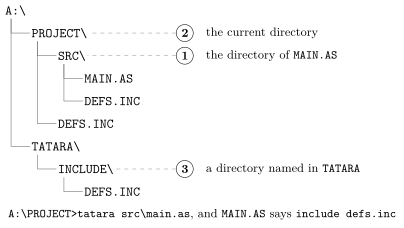
The directory of the including file comes first so that a project’s own include file always wins over another file of the same name in the current directory or in the TATARA directories. In figure 13.1, A:\PROJECT\DEFS.INC is in the current directory, but TATARA never reaches it: the copy in SRC is found first.
The current directory is still searched, second. If SRC had no DEFS.INC, TATARA would read the one in A:\PROJECT, the directory the command was typed in.
Note. The file named on the command line is not searched for. TATARA opens it as you typed it, from the current directory unless you name another (chapter 5). The three places apply only to INCLUDE.
13.3 The TATARA environment variable
Chapter 3 set TATARA to the directory of the include files that come with Tatara. It can name several directories, separated by semicolons, and TATARA tries them from left to right. In AUTOEXEC.BAT or another batch file:
set tatara=a:\tatara\include;a:\project\inc
At the prompt, the value goes between quotation marks, as in chapter 3.
A \ at the end of each directory is not needed, but does no harm.
The environment variable is the last of the three places. With the line above, a file that is in both directories comes from A:\TATARA\INCLUDE, the first one named. A file that is also in the current directory, or in the directory of the including file, comes from there, and the environment variable is not used at all.
13.4 Paths in the filename
The filename after INCLUDE can name a directory too.
A name that starts with a drive, such as A:\TATARA\INCLUDE\MSXDOS.INC, or with \, such as \TATARA\INCLUDE\MSXDOS.INC, is an absolute path: it says exactly where the file is. TATARA opens it as written and looks nowhere else.
Any other name is a relative path, and is looked for in each of the three places in turn. include sub\mid.inc looks for SUB\MID.INC in the directory of the including file, then in the current directory, then under each directory in TATARA.
On a Japanese MSX, \ appears as ¥, as in chapter 3. It is the same character.
13.5 Files that include files
An include file can include another. TATARA can have four files open at once: the source, and three levels of include files. A fourth level stops TATARA, and the message shows how it got there, one line for each level, innermost first:
D2.INC(2): ERROR: too many source files open at once.
    included from D1.INC(2)
    included from D0.INC(2)
    included from DEEPBAD.AS(2)
Here DEEPBAD.AS included D0.INC, which included D1.INC, which included D2.INC, and line 2 of D2.INC asked for a fifth file. A file that includes itself runs into the same limit.
Macros have a limit of their own, described in chapter 16.
13.6 Including a file twice
A file that holds only EQUs and macros can be included any number of times: the second time, each name gets the same value again, which is allowed (chapter 12), and a macro can be defined again (chapter 16).
A file that defines a label cannot. The second copy defines the label again:
CODE.INC(2): ERROR: this name already has a value.
    included from TWICELAB.AS(2)
Include a file that holds labels or code in one place only.
Warning. An include guard is a way some programmers make a file safe to include twice: the file’s contents go inside IFNDEF, which skips them when a name is already defined, and the first line inside defines that name. It does not work in TATARA.
                ifndef  gcode_inc
gcode_inc       equ     1
                cseg
shared:         ret
                endif
TATARA reads the source twice (chapter 5), and a name defined during the first reading is still defined during the second. So on the second reading gcode_inc is already defined, and IFNDEF skips the file even where it is included only once. TATARA notices that the label shared was not defined the second time, and stops:
GCODE.INC(4): ERROR: this label was defined on pass 1 and not on pass 2 - a conditional skipped it.TATARA’s messages call each reading a pass. Chapter 15 describes conditional assembly and the two passes.
13.7 END in an include file
END in an include file ends the whole source, not only that file (chapter 12). The lines after the INCLUDE are never read, and the summary line says where the source ended:
ended at ENDIT.INC(2)
An include file should not contain END.
13.8 Messages
Table 13.1 lists the messages about including files, each with a line that causes it.
Line |
Message |
include with no name |
INCLUDE without a filename. |
include nothere.inc, a file that is in none of the three places |
cannot open NOTHERE.INC |
a fifth file open at once, or a file that includes itself |
too many source files open at once. |
When TATARA cannot open an include file, the message has no file and line in front of it. The lines below it say where the file was asked for:
ERROR: cannot open NOTHERE.INC
    included from MIDMISS.INC(2)
    included from NESTMISS.AS(2)
Any other error inside an include file starts with that file’s name and line, followed by the same trail:
BAD.INC(2): ERROR: not a form this instruction has.
    included from MIDBAD.INC(2)
    included from ERRINC.AS(3)
Chapter 20 describes how to read a trail, including the lines it adds for macros.