Chapter 27
Linker error messages
When TANREN finds a mistake, it prints one error message and stops, as TATARA does (chapter 20). This chapter describes what TANREN’s messages look like, what it leaves on the disk when it stops, and the messages that the earlier chapters have not described: those about damaged object files and about segments. Appendix D lists every message, with its cause.
27.1 What a message says
A TANREN message is one line that starts with ERROR:. TANREN has no source line to point at, so a message names no line. When the mistake is in one object file, the message starts with that file’s name, in capitals, as TATARA’s messages start with the name of the source:
A:\>tanren main bad
...
BAD.TRO: ERROR: not a Tatara object file.
The other messages name a file inside the text, as in ERROR: cannot open MAIN,SUB.TRO (chapter 21), or name none, because the mistake belongs to no one file, as in ERROR: /D: would put the data on top of the code. (chapter 24). A few print lines of their own before the error, such as the list of names never defined (chapter 25).
When a message comes also says something about the mistake. Figure 27.1 shows the stages of a link, and the mistakes TANREN can find at each one. The messages about the command line and the link file come before the banner (section 21.6); the rest come after it.
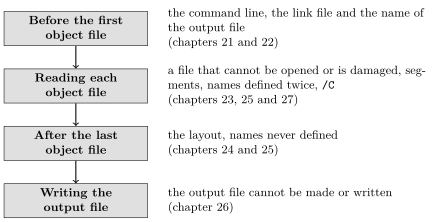
/Q leaves out the banner and the summary line, but never an error message.
27.2 TANREN stops at the first error
TANREN prints one message and stops. Correct the mistake and link again, and TANREN goes on to the next one, if there is one. With two damaged object files on the command line, only the first is reported:
A:\>tanren sub bad trunc /o:x.com
...
BAD.TRO: ERROR: not a Tatara object file.
The one exception is names that no module defines: TANREN lists all of them before it stops (section 25.3).
TANREN writes the output file only after it has read every object file twice, so an error stops it before the file is made. An output file of the same name from an earlier link is left as it was. MAIN.COM here is the one tanren main sub wrote, and a failed link of the same name does not change it:
A:\>dir main.com
...
MAIN     COM        38 26-10-01  8:25
 38 bytes in 1 file   2336K free
A:\>tanren main bad
...
BAD.TRO: ERROR: not a Tatara object file.
A:\>dir main.com
...
MAIN     COM        38 26-10-01  8:25
 38 bytes in 1 file   2336K free
After an error, the output file on the disk is not the program on the command line, but an older one. Do not run it until TANREN has linked without an error.
Warning. ERROR: cannot write the output file - the disk may be full. comes after TANREN has created the output file, while it is writing it. TANREN stops at once, and does not touch the disk again: after a disk error, anything more it did could do more damage. The output file is left on the disk, with only part of the program in it. Delete it, and make room on the disk or use another one, before linking again.
27.3 Damaged object files
An object file starts with a few bytes that mark it as a TATARA object file and give the version of its format (appendix F). TANREN checks them when it opens the file, and follows the file’s records to the end. These messages mean that the file is not what TATARA makes:
A:\>tanren main bad
...
BAD.TRO: ERROR: not a Tatara object file.
A:\>tanren trunc sub /o:x.com
...
TRUNC.TRO: ERROR: the object file ends inside a record.
A:\>tanren oldver sub /o:x.com
...
OLDVER.TRO: ERROR: this object file was made by another version.
- not a Tatara object file. The file does not start as an object file does. BAD.TRO is a source file that was given the extension .tro by mistake.
- the object file ends inside a record. The file stops in the middle of its contents. TRUNC.TRO is the first 30 bytes of a good object file, as a file cut short by a full disk or an interrupted copy would be.
- this object file was made by another version. The file is a TATARA object file, but in a format this TANREN does not read. Each version of TANREN reads the object files of the TATARA released with it.
In each case, assemble the module again with this version of TATARA, and link again.
27.3.1 Bytes after the end
The last record of an object file marks its end. When a file has anything after that record, TANREN names the file, and goes on:
A:\>tanren tail sub /o:tail.com
...
TAIL.TRO: bytes follow the END record.
2 modules, 16 records, AND BYTES AFTER THEM.
Wrote TAIL.COM, 0100-0125 (38 bytes), entry 0100.
This is not an error: the bytes after the end are not read, and the output file is written. But TATARA does not make such a file, so something else has changed it since it was assembled. Assemble that module again. /Q leaves out both lines.
27.4 Segments
A segment named in several modules is one segment (chapter 24), so it must be the same kind of segment in every module. SEGA.AS makes shared a code segment, and SEGB.AS a data segment:
; SEGA.AS - shared is a code segment here.
                public  ina
                cseg    shared
ina:            nop
                end
; SEGB.AS - and a data segment here.
                public  inb
                dseg    shared
inb:            db      0
                end
A:\>tanren sega segb /o:x.com
...
SEGB.TRO: ERROR: segment shared is declared differently.
The file named is the one where the second, different declaration was found: with tanren segb sega, it is SEGA.TRO.
27.4.1 The limits of one module
TANREN keeps up to 16 segments and 16 groups for each module. TATARA accepts more, so a module with too many is found only when it is linked:
A:\>tanren seg16 /o:x.com
...
SEG16.TRO: ERROR: too many segments or groups in one module.
SEG16.AS has the default code segment and fifteen named ones. Every object file also has the default data segment, even when nothing is in it, so this module has seventeen segments. A module can therefore have up to fourteen named segments, besides the default code and data segments. The groups of transient segments (section 10.6) are counted separately, up to sixteen in one module.
A program that needs more segments or groups can spread them over several modules: the limits apply to each module, not to the program.
27.5 Messages
Table 27.1 lists the messages described in this chapter. The others are described in chapters 21 to 26, and appendix D lists them all.
Message |
Meaning |
FILE: ERROR: not a Tatara object file. |
The file does not start as an object file does. |
FILE: ERROR: the object file ends inside a record. |
The file stops in the middle of its contents. |
FILE: ERROR: this object file was made by another version. |
The file’s format is not the one this TANREN reads. |
FILE: ERROR: segment NAME is declared differently. |
The segment is a different kind in this file and an earlier one. |
FILE: ERROR: too many segments or groups in one module. |
The module has more than 16 segments or more than 16 groups. |
FILE: bytes follow the END record. |
Not an error: the file has bytes after its last record. |
ERROR: cannot write the output file - the disk may be full. |
Writing the output file failed. Part of it is left on the disk. |