Chapter 10
Segments and the location counter
Chapter 2 introduced segments: areas of a program that hold one kind of content, code or data, and that TANREN places in memory separately. This chapter describes them in full: how TATARA keeps count of addresses in each segment, the directives that choose a segment, set its address and reserve space in it, the named segments that let a program keep related code or data together, and transient data segments, a feature of Tatara’s own that lets variables share memory.
10.1 The location counter
As TATARA assembles a segment, it counts the bytes each line produces (chapter 2). The count is the location counter. A label takes the value the location counter has at its line, and $ reads it in an expression (chapter 8).
Each segment has a location counter of its own. When a source changes segment, TATARA puts the current counter aside and takes up the other segment’s; when it comes back, it continues from where it stopped. In this source the code and the data are written in turns, and each kind is counted separately:
                cseg
start:          ld      hl,count
                inc     (hl)
                dseg
count:          ds      1
                cseg
again:          ret
                dseg
total:          ds      2
TATARA’s listing shows the address of each line:
  0000'   21 00 00              start:          ld      hl,count
  0003'   34                                    inc     (hl)
                                                dseg
  0000'                         count:          ds      1
                                                cseg
  0004'   C9                    again:          ret
                                                dseg
  0001'                         total:          ds      2
again is at offset 4 in the code segment, straight after inc (hl), and total at offset 1 in the data segment, straight after count. The apostrophe after an address means that it is relocatable: an offset in its segment, which TANREN finishes (chapter 2). The listing uses the same mark for code and data; chapter 18 describes it.
10.2 Code, data and absolute
Table 10.1 lists the three kinds of segment and the directive that selects each. A source starts in the code segment, so a program with no data of its own needs no directive at all.
Keeping code and data apart lets TANREN place the data somewhere other than straight after the code: a ROM cartridge, for instance, must keep its variables in RAM (chapter 33). By default TANREN places all the code segments first and the data segments after them; chapter 24 describes the order in full and the options that choose other addresses.
In the absolute segment every address is exactly the one written, and TANREN does not move it. It is for code or data that must be at a known address, such as the header of a ROM cartridge at 4000h.
Warning. A .COM program is loaded at 0100h and is one continuous block of bytes. An absolute address far from there, such as 4000h, makes the file cover everything in between, so it becomes about 16 KB long. Use the absolute segment for .COM programs only when you know why you need it.
10.3 ORG
ORG sets the location counter of the current segment. In the absolute segment its operand is an address; in the code and data segments it is an offset from the start of the segment.
                aseg
                org     4000h
rom:            db      'AB'            ; at address 4000h
                cseg
                org     10h
code10:         nop                     ; 10h bytes into the code
The operand of ORG must be known when TATARA first reaches the line, so it cannot use a name defined further down. It must also be absolute, or an address in the current segment: an address in the data segment cannot be the location counter of the code segment, and TATARA stops with the relocation error of chapter 8.
10.4 Reserving space: DS
DS (or DEFS, its other name) moves the location counter on by a number of bytes, and so reserves space for variables:
                dseg
buffer:         ds      128             ; 128 bytes
count:          ds      1               ; 1 byte
The count must be absolute and known on the first reading, like the operand of ORG. DS takes only the count: a second operand, such as a value to fill the space with, is a bad expression. DS writes no bytes: it only moves the location counter, so a program should give its variables a value before it reads them.
10.5 Named segments
A program can have more than one code segment and more than one data segment. A named segment is selected by writing a name after CSEG or DSEG:
                cseg    music           ; all the music code
                dseg    strings         ; all the text
                dseg    variables       ; all the variables
A named segment behaves like the plain one of its kind, with a location counter of its own, and every line that selects the same name adds to the same segment. Code for one purpose can therefore be written in several places, or in several source files, and still end up in one piece. TANREN joins the segments of the same name from every module it links.
In this source the code segment and the segment music are each selected twice:
                cseg
main:           nop
                cseg    music
play:           nop
                nop
                cseg
more:           nop
                cseg    music
stop:           ret
The symbol table (chapter 19) shows each segment with its size, and each label in the segment it belongs to:
CSEG - default code segment, 0002h bytes

0000h             main
0001h             more

music - named code segment, 0003h bytes

0000h             play
0002h             stop
Each segment is a kind of value of its own (section 8.6), because TANREN may place two segments anywhere relative to each other. The difference between labels in two different segments is therefore refused, with the relocation error.
10.6 Transient data segments
Most programs have variables that are used by only one part of the program. A routine that reads a line typed by the user needs a buffer for it while it reads; a routine that prints a report needs a buffer for the line it is building. If the two routines never run at the same time, the two buffers are never in use at the same time either, and they could occupy the same memory. On an MSX, where a .COM program has less than 64 KB for its code and its data together, the saving can matter.
Other assemblers leave this to the programmer, who has to work out the shared addresses by hand, usually with EQU, and keep them right every time a variable changes size. Tatara does it for you, with transient data segments.
10.6.1 How it works
A transient data segment is a named data segment with the word TRANSIENT after its name. Its variables are divided into groups, each started by a GROUP line with a name:
                dseg    scratch,transient
                group   reading         ; used only while reading
inbuf:          ds      64
inlen:          ds      2
                group   writing         ; used only while writing
outbuf:         ds      32
outlen:         ds      2
The rules are few:
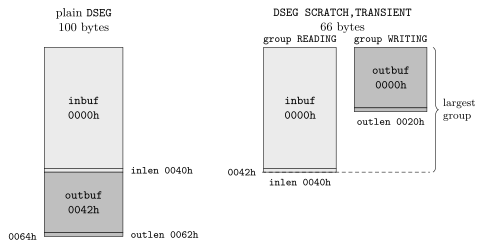
- Within a group, variables follow one another as in any data segment, and never overlap. inbuf and inlen are both usable at the same time.
- Every group starts at the beginning of the segment. outbuf is at the same address as inbuf.
- The segment is as large as its largest group.
- Every variable must be in a group: a DS line before the first GROUP is an error.
Figure 10.1 shows the four variables of the example in a plain data segment and in the transient one. In the plain segment they take 100 bytes; in the transient one they take 66, the size of the group reading, and the 34 bytes of writing cost nothing.
TATARA’s symbol table shows the segment and each group, with its size and the offset of each variable in it:
scratch - named data segment, transient, group reading, 0042h bytes

0000h             inbuf
0040h             inlen

scratch - named data segment, transient, group writing, 0022h bytes

0000h             outbuf
0020h             outlen
10.6.2 Using it safely
A group says which variables are in use together. Everything else is the programmer’s responsibility: TATARA does not follow the program to check that two groups are never in use at the same time.
Warning. A variable in one group has the same address as the variables at the same offset in every other group of the segment. Writing to one destroys the others. If the routine that uses writing called the routine that uses reading while outbuf still held a line it had not printed, the line typed by the user would be written over it. Put variables that must survive each other’s use in the same group, in different transient segments, or in a plain data segment.
Two points complete the rules:
- Only the groups of one transient segment overlap each other. Different segments never share memory, so a program can have one transient segment for each set of routines that take turns.
- Group names are global: a group of the same name in the same segment of another module is the same group, and TANREN joins them. Chapter 29 describes a program in several modules that uses this.
Labels in two different groups cannot be subtracted from each other, because neither of them says anything about the other’s position. TATARA gives the relocation error.
10.7 Messages
Table 10.2 lists the messages about segments, each with a line that causes it.
Line |
Message |
dseg vars,forever |
bad ASEG, CSEG or DSEG line. |
dseg and a name of 17 characters |
a segment or group name may be at most 16 characters. |
dseg vars,transient, after dseg vars |
this segment was declared differently before. |
group oops in the code segment |
GROUP needs a name, no label, and a transient DSEG. |
| this transient DSEG needs a GROUP first. |
|
dw second-first, labels in two groups or two segments |
relocation error - a segment-relative value is not allowed here. |
org v, v in another segment |
relocation error - a segment-relative value is not allowed here. |
A program can have a limited number of segments, groups and external names; going past it gives too many segments, groups or externals. Appendix E lists the limits.