第30章
マクロとリスティングのモード
マクロはソースの1行を複数の行に変え、繰り返しブロックは数行を多くの行に変えます。リスティング(18章)は、それが何に変わったかを示し、そのうちどれだけを示すかはソースで決められます。この章では、A:\TATARA\EXAMPLES\MACROSにある例、MACROSを使って、そのソースにあるマクロと繰り返しブロック、それが作るプログラム、そして同じ行を3つのリスティングのモードで見ていきます。
30.1 この例
MACROSは2行を表示し、それぞれのあとで少し待ちます。
A:\TATARA\EXAMPLES\MACROS>macros
A macro is a line that becomes many.
LOCAL is why DELAY can be used twice.
この例には3つのファイルがあります。ソースのMACROS.AS、それをすべてリスティングする2行のソースLALL.AS、そしてプログラムと 2つのリスティングを作るBUILD.BATです。
30.2 ソース
; MACROS.AS - a line that becomes many.
;
; MACRO defines one, ENDM ends the definition, and the name is then
; used like a mnemonic. LOCAL, REPT and IRP are below.

                include msxdos.inc      ; _STROUT, _TERM0 and "system"
                include ascii.inc       ; CHR_CR and CHR_LF

; PRINT - three instructions from one line. The parameter is
; substituted wherever the name appears in the body.

print           macro   addr
                ld      de,addr
                system  _STROUT ; a macro inside a macro
                endm

; DELAY - and why LOCAL exists. The body has a label in it, and a
; macro used twice would define that label twice. LOCAL makes a fresh
; name for each expansion, so this may be used as often as you like.

delay           macro   n
                local   loop
                ld      bc,n
loop:           dec     bc
                ld      a,b
                or      c
                jr      nz,loop
                endm

                cseg

start:          print   msg1
                delay   20000
                print   msg2
                delay   20000
                system  _TERM0

msg1:           db      "A macro is a line that becomes many.",CHR_CR,CHR_LF,"$"
msg2:           db      "LOCAL is why DELAY can be used twice.",CHR_CR,CHR_LF,"$"

; REPT repeats a body a counted number of times, with no parameter.
; Neither it nor IRP takes a label: the body is what produces the
; bytes, and a label belongs on a line inside it.

                rept    8
                db      0ffh
                endm

; IRP repeats it once for each item in the list, and IRPC once for
; each character of a word. INSIDE A STRING the parameter is only
; substituted if an ampersand is put in front of it, which is how M80
; tells a parameter from two letters that happen to match.

                irp     n,<1,2,4,8>
                db      n
                endm

                irpc    c,TATARA
                db      '&c'
                endm
                db      0

                end     start
ソースには、2つのマクロ、それを使うプログラム、そして3つの繰り返しブロックがあります。
- printは、文字列のアドレスをDEに入れ、MSX-DOSのファンクション_STROUTで表示します。表示にはsystemを使っていて、これ自体もMSXDOS.INCにあるマクロです。マクロは別のマクロを使えます(16.7節)。
- delayは、BCを引数の値から0まで数え下げます。そのループにはラベルが必要ですが、ラベルは1回しか定義できないので、local loopで、マクロを使うたびにラベルに新しい名前を付けます(16.5節)。
- プログラムはstartから始まり、それぞれのマクロを 2回ずつ使い、system _TERM0で終わります。5行のソースが18個の命令になります。
- 繰り返しブロックは、プログラムが使わないバイトをプログラムのあとに加えます。リスティングのためにあるものです。REPTはFFhを8バイト、IRPは1、2、4、8のバイト、IRPCはTATARAの文字を1文字ずつ作ります。’&c’がその文字です。文字列の中では、パラメーターは前に&があるときだけ置き換えられます(17章、16.3節)。
LALL.ASは、同じプログラムの前に1行を加えたものです。
; LALL.AS - the same program, listed in full.
;
; .LALL asks for every line of every macro expansion, including the
; ones that produce no bytes. The default is .XALL, which keeps only
; the lines that emitted something. Nothing else here differs from
; MACROS.AS, so the two listings differ only in what they show.

                .lall
                include macros.as
30.3 作って実行する
rem BUILD.BAT - EXAMPLE: MACROS
rem
rem The listing is the example here. /L writes one, and the file it
rem goes to is named THIRD on the command line, after the source and
rem the object.
rem
rem A listing shows the bytes a line produced, and a line that came
rem out of a macro is marked with a +. HOW MUCH of an expansion is
rem listed is a choice, and the source makes it three times:
rem
rem   .LALL   every line of every expansion
rem   .XALL   only the lines that produced bytes (the default)
rem   .SALL   none of them, only the call
rem
rem It is assembled twice, to two listings, so the two can be read
rem side by side.

rem The headers are in A:\TATARA\INCLUDE and are not copied here.
rem TATARA is rule 3 of the include search - see the DIRS example.
rem CHANGE THE PATH BELOW if you put the tree somewhere else.

set TATARA=a:\tatara\include

echo === Assembling, listing under the default XALL
tatara /q /l macros.as macros.tro macxall.lst

echo === Assembling again, listing everything
tatara /q /l lall.as lall.tro maclall.lst

echo === Linking
tanren /q /o:macros.com macros.tro

echo === Done. Compare MACXALL.LST with MACLALL.LST, then type MACROS.

set TATARA=
/Lは、コマンド・ラインの3番目に指定したファイルにリスティングを書き出します(18.1節)。MACROS.ASはMACXALL.LSTに、LALL.ASはMACLALL.LSTにアセンブルされ、リンクされるのはMACROS.TROだけです。
A:\TATARA\EXAMPLES\MACROS>build
=== Assembling, listing under the default XALL
=== Assembling again, listing everything
=== Linking
=== Done. Compare MACXALL.LST with MACLALL.LST, then type MACROS.
A:\TATARA\EXAMPLES\MACROS>macros
A macro is a line that becomes many.
LOCAL is why DELAY can be used twice.
プログラムは、0100hから0186hまでの135バイトです。
30.4 3つのリスティングのモード
どちらのリスティングも約33 KBあります。プログラムの前に2つのインクルード・ファイルが1行ずつリスティングされ、プログラム自身の行は339行目から始まります。INCLUDEの行を.XLISTと.LISTではさめば、それを省けます(18.3節)。以下の例は、それぞれのリスティングのうちプログラムの部分です。
30.4.1 標準の.XALL
MACXALL.LSTは、展開された行のうちバイトを作る行を、+を付けてリスティングします。
  0000'                         start:          print   msg1
  0000'   11 25 00        +                     ld      de,msg1
  0003'   0E 09           +                     ld      c,_STROUT
  0005'   CD 05 00        +                     call    BDOS
                                                delay   20000
  0008'   01 20 4E        +                     ld      bc,20000
  000B'   0B              +     ??0000:         dec     bc
  000C'   78              +                     ld      a,b
  000D'   B1              +                     or      c
  000E'   20 FB           +                     jr      nz,??0000
                                                print   msg2
  0010'   11 4C 00        +                     ld      de,msg2
  0013'   0E 09           +                     ld      c,_STROUT
  0015'   CD 05 00        +                     call    BDOS
                                                delay   20000
  0018'   01 20 4E        +                     ld      bc,20000
  001B'   0B              +     ??0001:         dec     bc
  001C'   78              +                     ld      a,b
  001D'   B1              +                     or      c
  001E'   20 FB           +                     jr      nz,??0001
                                                system  _TERM0
  0020'   0E 00           +                     ld      c,_TERM0
  0022'   CD 05 00        +                     call    BDOS
ここには、ソースにない2つのことが表れています。delayのループのラベルは、1回目は??0000、2回目は??0001です。これがLOCALの作った名前です(16.5節)。そして、printのsystem _STROUTの行は、その2つの命令はリスティングされているのに、行そのものはリスティングされていません。その行自体はバイトを作らず、展開された行がバイトを作るからです。
繰り返しブロックも同じようにリスティングされます。書いたとおりのブロックのあとに、それが作った各行が続きます。
                                                irpc    c,TATARA
                                                db      '&c'
                                                endm
  0080'   54              +                     db      'T'
  0081'   41              +                     db      'A'
  0082'   54              +                     db      'T'
  0083'   41              +                     db      'A'
  0084'   52              +                     db      'R'
  0085'   41              +                     db      'A'
  0086'   00                                    db      0
30.4.2 .LALL
MACLALL.LSTは、すべての展開のすべての行をリスティングします。このプログラムで違うのは、systemを使う行だけです。この行は自分ではバイトを作らないので、アドレスなしでリスティングされます。
  0000'                         start:          print   msg1
  0000'   11 25 00        +                     ld      de,msg1
                          +                     system  _STROUT ; a macro inside a macro
  0003'   0E 09           +                     ld      c,_STROUT
  0005'   CD 05 00        +                     call    BDOS
条件付きアセンブルを含むマクロでは、もっと違いが出ます。.LALLでは、条件によって飛ばされた行もリスティングされます(18.4節)。
30.4.3 .SALL
この例は3つ目のモードを使っていません。SALL.ASは、LALL.ASと同じく、1行とINCLUDEだけです。
; SALL.AS - the same program, with no expansion listed.

                .sall
                include macros.as
A:\TATARA\EXAMPLES\MACROS>tatara /l sall.as sall.tro macsall.lst
...
ended at MACROS.AS(63)
MACSALL.LSTは、どの展開の行もリスティングしません。マクロを使う各行には、リスティングに表れている以上のものがあることを示すため、+が付きます。
  0000'                   +     start:          print   msg1
                          +                     delay   20000
                          +                     print   msg2
                          +                     delay   20000
                          +                     system  _TERM0
繰り返しブロックは書いたとおりにリスティングされ、それが作るバイトはリスティングのどこにも表れません。
図30.1に、1つの呼び出しについて3つのモードを並べて示します。
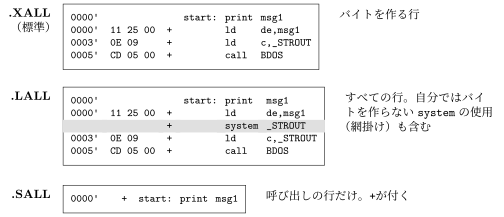
ふつうは.XALLを使います。すべてのバイトが、それを作った行の隣にリスティングされるからです。.LALLは、マクロが何をするかを、条件付きアセンブルも含めて1行ずつ調べるためのものです。.SALLは、マクロを信頼できるようになってから、ソースのように読めるリスティングを作るためのものです。3つは1つのソースの中で混ぜて使えます。それぞれ、その行から、3つのうち次のものが現れるまで効きます。
30.5 試してみること
次のファイルは例には含まれていません。BUILD.BATと同じようにTATARAを設定して、例のディレクトリに作ってください。
30.5.1 LOCALを外す
NOLOCAL.ASは、MACROS.ASからlocal loopの行を除いたものです。delayの1回目の使用でloopが定義され、2回目でもう一度定義されます。
A:\TATARA\EXAMPLES\MACROS>tatara nolocal.as nolocal.tro
...
NOLOCAL.AS(23): ERROR: this name already has a value.
    in delay, called from NOLOCAL.AS(34)
23行目はdelayの定義の中のloop:で、34行目は2回目のdelay 20000です(20.3節)。
30.5.2 &を外す
NOAMP.ASは、MACROS.ASのIRPCのdb ’&c’をdb ’c’にしたものです。エラーなしでアセンブルできますが、文字列の中のcはもうパラメーターではなく、ただの文字です。
A:\TATARA\EXAMPLES\MACROS>tatara /l noamp.as noamp.tro noamp.lst
...
ended at NOAMP.AS(63)
                                                irpc    c,TATARA
                                                db      'c'
                                                endm
  0080'   63              +                     db      'c'
  0081'   63              +                     db      'c'
  0082'   63              +                     db      'c'
  0083'   63              +                     db      'c'
  0084'   63              +                     db      'c'
  0085'   63              +                     db      'c'
この例ではTATARAの6文字が入るところに、文字cである63hが 6バイト入ります。このような誤りではTATARAは止まらないので、見つける場所はリスティングです。