Chapter 30
Macros and the listing modes
A macro turns one line of the source into several, and a repeat block turns a few lines into many. The listing (chapter 18) shows what they turned into, and how much of it is up to the source. This chapter follows both through MACROS, the example in A:\TATARA\EXAMPLES\MACROS: the macros and repeat blocks in its source, the program they make, and the same lines in the three listing modes.
30.1 The example
MACROS prints two lines, with a pause after each:
A:\TATARA\EXAMPLES\MACROS>macros
A macro is a line that becomes many.
LOCAL is why DELAY can be used twice.
The example has three files: the source, MACROS.AS; a second source of two lines, LALL.AS, that lists the first in full; and BUILD.BAT, which makes the program and two listings of it.
30.2 The source
; MACROS.AS - a line that becomes many.
;
; MACRO defines one, ENDM ends the definition, and the name is then
; used like a mnemonic. LOCAL, REPT and IRP are below.

                include msxdos.inc      ; _STROUT, _TERM0 and "system"
                include ascii.inc       ; CHR_CR and CHR_LF

; PRINT - three instructions from one line. The parameter is
; substituted wherever the name appears in the body.

print           macro   addr
                ld      de,addr
                system  _STROUT ; a macro inside a macro
                endm

; DELAY - and why LOCAL exists. The body has a label in it, and a
; macro used twice would define that label twice. LOCAL makes a fresh
; name for each expansion, so this may be used as often as you like.

delay           macro   n
                local   loop
                ld      bc,n
loop:           dec     bc
                ld      a,b
                or      c
                jr      nz,loop
                endm

                cseg

start:          print   msg1
                delay   20000
                print   msg2
                delay   20000
                system  _TERM0

msg1:           db      "A macro is a line that becomes many.",CHR_CR,CHR_LF,"$"
msg2:           db      "LOCAL is why DELAY can be used twice.",CHR_CR,CHR_LF,"$"

; REPT repeats a body a counted number of times, with no parameter.
; Neither it nor IRP takes a label: the body is what produces the
; bytes, and a label belongs on a line inside it.

                rept    8
                db      0ffh
                endm

; IRP repeats it once for each item in the list, and IRPC once for
; each character of a word. INSIDE A STRING the parameter is only
; substituted if an ampersand is put in front of it, which is how M80
; tells a parameter from two letters that happen to match.

                irp     n,<1,2,4,8>
                db      n
                endm

                irpc    c,TATARA
                db      '&c'
                endm
                db      0

                end     start
The source has two macros, a program that uses them, and three repeat blocks:
- print loads the address of a string into DE and prints it with the MSX-DOS function _STROUT. It does the printing with system, which is itself a macro, from MSXDOS.INC: a macro can use another (section 16.7).
- delay counts BC down from its argument to 0. Its loop needs a label, and a label can be defined only once, so local loop gives the label a new name each time the macro is used (section 16.5).
- The program, at start, uses each macro twice and ends with system _TERM0. Five lines of source become eighteen instructions.
- The repeat blocks add bytes after the program that it never uses; they are there for the listing. REPT makes eight bytes of FFh, IRP the bytes 1, 2, 4 and 8, and IRPC the letters of TATARA, one for each character. ’&c’ is the character: in a string, a parameter is replaced only when & comes before it (chapter 17, section 16.3).
LALL.AS is the same program, with one line before it:
; LALL.AS - the same program, listed in full.
;
; .LALL asks for every line of every macro expansion, including the
; ones that produce no bytes. The default is .XALL, which keeps only
; the lines that emitted something. Nothing else here differs from
; MACROS.AS, so the two listings differ only in what they show.

                .lall
                include macros.as
30.3 Building and running it
rem BUILD.BAT - EXAMPLE: MACROS
rem
rem The listing is the example here. /L writes one, and the file it
rem goes to is named THIRD on the command line, after the source and
rem the object.
rem
rem A listing shows the bytes a line produced, and a line that came
rem out of a macro is marked with a +. HOW MUCH of an expansion is
rem listed is a choice, and the source makes it three times:
rem
rem   .LALL   every line of every expansion
rem   .XALL   only the lines that produced bytes (the default)
rem   .SALL   none of them, only the call
rem
rem It is assembled twice, to two listings, so the two can be read
rem side by side.

rem The headers are in A:\TATARA\INCLUDE and are not copied here.
rem TATARA is rule 3 of the include search - see the DIRS example.
rem CHANGE THE PATH BELOW if you put the tree somewhere else.

set TATARA=a:\tatara\include

echo === Assembling, listing under the default XALL
tatara /q /l macros.as macros.tro macxall.lst

echo === Assembling again, listing everything
tatara /q /l lall.as lall.tro maclall.lst

echo === Linking
tanren /q /o:macros.com macros.tro

echo === Done. Compare MACXALL.LST with MACLALL.LST, then type MACROS.

set TATARA=
/L writes a listing to the file named third on the command line (section 18.1). MACROS.AS is assembled into MACXALL.LST, and LALL.AS into MACLALL.LST; only MACROS.TRO is linked.
A:\TATARA\EXAMPLES\MACROS>build
=== Assembling, listing under the default XALL
=== Assembling again, listing everything
=== Linking
=== Done. Compare MACXALL.LST with MACLALL.LST, then type MACROS.
A:\TATARA\EXAMPLES\MACROS>macros
A macro is a line that becomes many.
LOCAL is why DELAY can be used twice.
The program is 135 bytes long, from 0100h to 0186h.
30.4 The three listing modes
Each listing is about 33 KB. Both include files are listed, line by line, before the program: the program’s own lines start at line 339. .XLIST and .LIST around the INCLUDE lines would leave them out (section 18.3). The examples below are the program’s part of each listing.
30.4.1 .XALL, the default
MACXALL.LST lists the lines of each expansion that produce bytes, marked with +:
  0000'                         start:          print   msg1
  0000'   11 25 00        +                     ld      de,msg1
  0003'   0E 09           +                     ld      c,_STROUT
  0005'   CD 05 00        +                     call    BDOS
                                                delay   20000
  0008'   01 20 4E        +                     ld      bc,20000
  000B'   0B              +     ??0000:         dec     bc
  000C'   78              +                     ld      a,b
  000D'   B1              +                     or      c
  000E'   20 FB           +                     jr      nz,??0000
                                                print   msg2
  0010'   11 4C 00        +                     ld      de,msg2
  0013'   0E 09           +                     ld      c,_STROUT
  0015'   CD 05 00        +                     call    BDOS
                                                delay   20000
  0018'   01 20 4E        +                     ld      bc,20000
  001B'   0B              +     ??0001:         dec     bc
  001C'   78              +                     ld      a,b
  001D'   B1              +                     or      c
  001E'   20 FB           +                     jr      nz,??0001
                                                system  _TERM0
  0020'   0E 00           +                     ld      c,_TERM0
  0022'   CD 05 00        +                     call    BDOS
Two things show here that the source does not. The label of delay’s loop is ??0000 the first time and ??0001 the second: those are the names LOCAL made (section 16.5). And the system _STROUT line of print is not listed, although its two instructions are: the line itself produces no bytes, the lines of its expansion do.
The repeat blocks are listed the same way: the block as written, and then each line it produced:
                                                irpc    c,TATARA
                                                db      '&c'
                                                endm
  0080'   54              +                     db      'T'
  0081'   41              +                     db      'A'
  0082'   54              +                     db      'T'
  0083'   41              +                     db      'A'
  0084'   52              +                     db      'R'
  0085'   41              +                     db      'A'
  0086'   00                                    db      0
30.4.2 .LALL
MACLALL.LST lists every line of every expansion. The only difference in this program is the line that uses system, listed without an address, because it produces no bytes of its own:
  0000'                         start:          print   msg1
  0000'   11 25 00        +                     ld      de,msg1
                          +                     system  _STROUT ; a macro inside a macro
  0003'   0E 09           +                     ld      c,_STROUT
  0005'   CD 05 00        +                     call    BDOS
A macro with a conditional in it shows more: under .LALL, the lines the conditional skipped are listed too (section 18.4).
30.4.3 .SALL
The example does not use the third mode. SALL.AS, like LALL.AS, is one line and the INCLUDE:
; SALL.AS - the same program, with no expansion listed.

                .sall
                include macros.as
A:\TATARA\EXAMPLES\MACROS>tatara /l sall.as sall.tro macsall.lst
...
ended at MACROS.AS(63)
MACSALL.LST lists no line of any expansion. Each line that uses a macro is marked with +, to show that there is more to it than the listing shows:
  0000'                   +     start:          print   msg1
                          +                     delay   20000
                          +                     print   msg2
                          +                     delay   20000
                          +                     system  _TERM0
The repeat blocks are listed as they are written, and none of the bytes they produce appear anywhere in the listing.
Figure 30.1 puts the three side by side for one call.
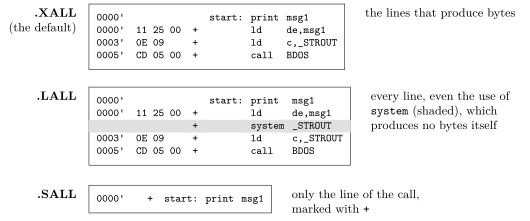
.XALL is the usual choice: every byte is in the listing, next to the line that made it. .LALL is for finding out what a macro does, line by line, including its conditionals. .SALL is for a listing that reads like the source, once the macros are trusted. The three can be mixed in one source: each applies from its line to the next of the three.
30.5 Things to try
The files below are not part of the example: make them in its directory, with TATARA set as in BUILD.BAT.
30.5.1 Leave out LOCAL
NOLOCAL.AS is MACROS.AS without the line local loop. The first use of delay defines loop; the second defines it again:
A:\TATARA\EXAMPLES\MACROS>tatara nolocal.as nolocal.tro
...
NOLOCAL.AS(23): ERROR: this name already has a value.
    in delay, called from NOLOCAL.AS(34)
Line 23 is loop: in the definition of delay, and line 34 is the second delay 20000 (section 20.3).
30.5.2 Leave out the &
NOAMP.AS is MACROS.AS with db ’c’ in place of db ’&c’ in the IRPC. It assembles without an error, but inside the string, c is no longer the parameter; it is the letter:
A:\TATARA\EXAMPLES\MACROS>tatara /l noamp.as noamp.tro noamp.lst
...
ended at NOAMP.AS(63)
                                                irpc    c,TATARA
                                                db      'c'
                                                endm
  0080'   63              +                     db      'c'
  0081'   63              +                     db      'c'
  0082'   63              +                     db      'c'
  0083'   63              +                     db      'c'
  0084'   63              +                     db      'c'
  0085'   63              +                     db      'c'
Six bytes of 63h, the letter c, where the example has the six letters of TATARA. A mistake like this one does not stop TATARA; the listing is where to see it.