第34章
複数のディレクトリに
またがるプロジェクト
ある程度の大きさのプログラムは、すぐに1つのディレクトリに収まらなくなります。ソースはある場所に、それが取り込むファイルはその隣に、ほかのプログラムと共有するヘッダーは別の場所に、そしてオブジェクト・ファイルはそれらとは別に置くこともあります。この章では、A:\TATARA\EXAMPLES\DIRSにある例、DIRSを作ります。ファイルが3つのディレクトリに分かれている例で、TATARAがそれぞれをどのように見つけるかをたどります(13章)。そのあとで、同じプログラムを別の方法でも作ります。別のディレクトリから作る方法、TATARAに相対パスのディレクトリを書く方法、そしてオブジェクト・ファイルとリンク・ファイルを専用のディレクトリに置く方法です。
34.1 この例
DIRSは3行を表示します。それぞれの行は別々のインクルード・ファイルにあり、そのファイルを見つけた探し方の規則を示しています。
A:\TATARA\EXAMPLES\DIRS>dirs
Rule 1: beside the file that asked.
Rule 1 again, one level deeper.
Rule 3: found through TATARA.
TATARAは、インクルード・ファイルを次の3つの場所でこの順に探します(13.2節)。
図34.1に、この例のファイルと、DIRSから作るときにそれぞれを見つける規則を示します。
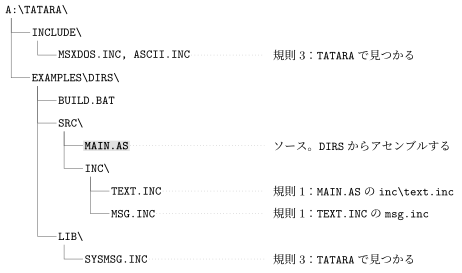
34.2 ソース
モジュールはSRC\MAIN.ASです。
; SRC\MAIN.AS - a program whose parts are in three directories.
;
; AN INCLUDE IS LOOKED FOR IN THREE PLACES, IN THIS ORDER:
;
;   1. the directory of the file doing the including
;   2. the current directory
;   3. each directory named in the TATARA environment variable
;
; Rule 1 comes first so that a file always finds the header sitting
; beside it, whatever directory you happen to be standing in when you
; run the build. Neither line below depends on where that is.

                include ascii.inc       ; CHR_CR and CHR_LF, for the messages
                include msxdos.inc      ; rule 3: TATARA names the
                                        ;   directory it is in

                cseg

start:          ld      de,text
                call    prtstr
                ld      de,deeper
                call    prtstr
                ld      de,sysmsg
                call    prtstr
                system  _TERM0

prtstr:         ld      c,_STROUT
                jp      BDOS            ; and BDOS returns to the caller

; THE MESSAGES COME AFTER THE CODE. Each include below holds a DB,
; and MSX-DOS starts a .COM at 0100h: text there would be run as
; instructions.

                include inc\text.inc    ; rule 1, with a separator:
                                        ;   relative to THIS file
                include sysmsg.inc      ; rule 3 as well, from the OTHER
                                        ;   directory in TATARA

                end     start
このソースは4つのファイルを、2つのグループに分けて取り込んでいます。
- 先頭のASCII.INCとMSXDOS.INCは、名前とsystemマクロを定義するだけで、バイトを作りません。どちらもMAIN.ASの隣にもカレント・ディレクトリにもないので、規則3によって、TATARAの最初のディレクトリA:\TATARA\INCLUDEで見つかります。
- コードのあとのINC\TEXT.INCとSYSMSG.INCは、それぞれメッセージを持っています。これらがコードのあとにあるのは、バイトを作るからです。startより前に置くと、テキストが0100hに置かれ、プログラムが始まるときにMSX-DOSがそれを命令として実行してしまいます(21.1節)。
inc\text.incは名前にディレクトリを含みますが、ドライブも先頭の\もないので相対パスです(13.4節)。規則1はこれをMAIN.ASから見た位置、つまりSRC\INCで探します。SRC\INC\TEXT.INCは最初のメッセージを持ち、MSG.INCを取り込みます。
; SRC\INC\TEXT.INC - reached as inc\text.inc from SRC\MAIN.AS, so
; rule 1 found it: a name with a separator in it is still relative to
; the file that asked for it.
;
; The include below has no directory at all, and rule 1 finds it
; beside THIS file rather than beside MAIN.AS.

                include msg.inc

text:           db      "Rule 1: beside the file that asked.",CHR_CR,CHR_LF,"$"
このINCLUDEについての規則1はTEXT.INCのディレクトリなので、MSG.INCもSRC\INCで見つかります。
; SRC\INC\MSG.INC - a bare name, included from TEXT.INC, which lives
; in this directory.
;
; IF THE SEARCH STARTED IN THE CURRENT DIRECTORY, THIS WOULD NOT BE
; FOUND: the build runs two levels up, and there is no MSG.INC there.

deeper:         db      "Rule 1 again, one level deeper.",CHR_CR,CHR_LF,"$"
LIB\SYSMSG.INCは、そのどちらのディレクトリにも、カレント・ディレクトリにもありません。見つかるのは、BUILD.BATがLIBをTATARAに入れているからです。
; LIB\SYSMSG.INC - not beside MAIN.AS, and not in the directory the
; build runs from. BUILD.BAT puts this directory in TATARA, which is
; rule 3, and that is how a project keeps its shared headers in one
; place instead of a copy per program.

sysmsg:         db      "Rule 3: found through TATARA.",CHR_CR,CHR_LF,"$"
34.3 作って実行する
rem BUILD.BAT - EXAMPLE: DIRS
rem
rem Sources in SRC, headers beside them in SRC\INC, shared headers in
rem LIB. The build runs from HERE and nothing is copied anywhere.
rem
rem TATARA holds the directories rule 3 looks in - the same idea as
rem PATH, and the same shape: several may be separated by semicolons.
rem It is set for the build and cleared afterwards so that nothing
rem outside this example inherits it.
rem
rem THE PATH BELOW IS ABSOLUTE and names this example. MSX-DOS gives a
rem batch file no way to ask where it is, so change this line if you
rem put the tree somewhere else.

set TATARA=a:\tatara\include;a:\tatara\examples\dirs\lib

echo === Assembling SRC\MAIN.AS
tatara /q src\main.as dirs.tro

echo === Linking
tanren /q /o:dirs.com dirs.tro

set TATARA=

echo === Done. Type DIRS to run it.
TATARAには、セミコロンで区切った2つのディレクトリが入っています(13.3節)。バッチ・ファイルはDIRSから実行し、ソースをsrc\main.asと指定します。オブジェクト・ファイルとプログラムはDIRSに書き出されます。
A:\TATARA\EXAMPLES\DIRS>build
=== Assembling SRC\MAIN.AS
=== Linking
=== Done. Type DIRS to run it.
A:\TATARA\EXAMPLES\DIRS>dirs
Rule 1: beside the file that asked.
Rule 1 again, one level deeper.
Rule 3: found through TATARA.
/Qなしで実行すると、プログラムが当然そうあるべきように、0100hのコードから始まることがTANRENの表示でわかります。
A:\TATARA\EXAMPLES\DIRS>tanren /o:dirs.com dirs.tro
...
1 modules, 7 records, ends at EOF.
Wrote DIRS.COM, 0100-0183 (132 bytes), entry 0100.
34.4 試してみること
次のどれもDIRSから始め、特に書いていなければTATARAはBUILD.BATと同じように設定します。
34.4.1 TATARAからLIBを外す
TATARAにインクルード用のディレクトリしかないと、SYSMSG.INCはどこからも見つかりません。
A:\TATARA\EXAMPLES\DIRS>set tatara=a:\tatara\include
A:\TATARA\EXAMPLES\DIRS>tatara src\main.as nolib.tro
...
ERROR: cannot open SYSMSG.INC
    included from SRC\MAIN.AS(36)
メッセージは、書いたとおりのファイル名と、それを求めたMAIN.ASの行を示します。
34.4.2 TATARAに相対パスのディレクトリを書く
TATARAのディレクトリも、ほかのパスと同じように相対パスで書けます。
A:\TATARA\EXAMPLES\DIRS>set tatara=a:\tatara\include;lib
A:\TATARA\EXAMPLES\DIRS>tatara src\main.as rel.tro
...
ended at SRC\MAIN.AS(39)
libはカレント・ディレクトリから見た位置なので、これがうまくいくのはDIRSから作るときだけです。BUILD.BATは絶対パスを使っているので、どこから作ってもTATARAの意味は変わりません。
34.4.3 別のディレクトリから作る
規則1はカレント・ディレクトリに左右されません。SRCの中からアセンブルしても、MAIN.ASはINC\TEXT.INCとMSG.INCを見つけ、残りはTATARAが見つけます。
A:\TATARA\EXAMPLES\DIRS>cd src
A:\TATARA\EXAMPLES\DIRS\SRC>tatara main.as ..\dirs2.tro
...
ended at MAIN.AS(39)
A:\TATARA\EXAMPLES\DIRS\SRC>cd ..
A:\TATARA\EXAMPLES\DIRS>tanren /o:dirs2.com dirs2.tro
...
Wrote DIRS2.COM, 0100-0183 (132 bytes), entry 0100.
A:\TATARA\EXAMPLES\DIRS>dirs2
Rule 1: beside the file that asked.
Rule 1 again, one level deeper.
Rule 3: found through TATARA.
34.4.4 オブジェクト・ファイルを分けて置く
大きなプロジェクトでは、オブジェクト・ファイルと、それを指定するリンク・ファイルを、専用のディレクトリに置くことがよくあります。OBJ\DIRS.LNKはそのようなリンク・ファイルです。
; DIRS.LNK - the link, kept with the object files.
main
/o:dirs3.com
TATARAはオブジェクト・ファイルをOBJに書き出し、TANRENはリンク・ファイルを与えられると、まずその隣でMAIN.TROを探します(23.1節)。
A:\TATARA\EXAMPLES\DIRS>tatara /q src\main.as obj\main.tro
A:\TATARA\EXAMPLES\DIRS>tanren @obj\dirs
...
1 modules, 7 records, ends at EOF.
Wrote DIRS3.COM, 0100-0183 (132 bytes), entry 0100.
A:\TATARA\EXAMPLES\DIRS>dirs3
Rule 1: beside the file that asked.
Rule 1 again, one level deeper.
Rule 3: found through TATARA.
DIRS3.COMはOBJではなく、カレント・ディレクトリのDIRSに書き出されます。/O:は名前を書いたとおりに使うからです(21.2節)。プログラムを別の場所に置くには、/o:bin\dirs3.comのように、名前にパスを含めてください。