Chapter 34
A project in several directories
A program of any size soon outgrows one directory: its sources in one place, the files it includes beside them, headers shared with other programs somewhere else, and perhaps the object files apart from all of them. This chapter builds DIRS, the example in A:\TATARA\EXAMPLES\DIRS, whose files are spread over three directories, and follows how TATARA finds each of them (chapter 13). It then builds the same program in other ways: from another directory, with a relative directory in TATARA, and with the object file and a link file in a directory of their own.
34.1 The example
DIRS prints three lines. Each one is in a different include file, and says which rule of the search found that file:
A:\TATARA\EXAMPLES\DIRS>dirs
Rule 1: beside the file that asked.
Rule 1 again, one level deeper.
Rule 3: found through TATARA.
TATARA looks for an include file in three places, in this order (section 13.2):
- the directory of the file that holds the INCLUDE;
- the current directory;
- each directory named in TATARA.
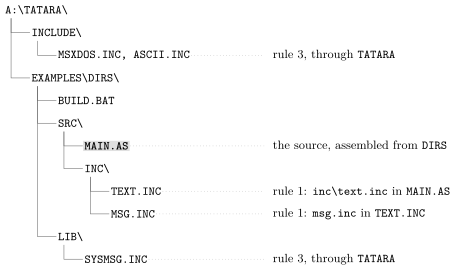
Figure 34.1 shows the example’s files, and the rule that finds each one when the program is built from DIRS.
34.2 The sources
SRC\MAIN.AS is the module:
; SRC\MAIN.AS - a program whose parts are in three directories.
;
; AN INCLUDE IS LOOKED FOR IN THREE PLACES, IN THIS ORDER:
;
;   1. the directory of the file doing the including
;   2. the current directory
;   3. each directory named in the TATARA environment variable
;
; Rule 1 comes first so that a file always finds the header sitting
; beside it, whatever directory you happen to be standing in when you
; run the build. Neither line below depends on where that is.

                include ascii.inc       ; CHR_CR and CHR_LF, for the messages
                include msxdos.inc      ; rule 3: TATARA names the
                                        ;   directory it is in

                cseg

start:          ld      de,text
                call    prtstr
                ld      de,deeper
                call    prtstr
                ld      de,sysmsg
                call    prtstr
                system  _TERM0

prtstr:         ld      c,_STROUT
                jp      BDOS            ; and BDOS returns to the caller

; THE MESSAGES COME AFTER THE CODE. Each include below holds a DB,
; and MSX-DOS starts a .COM at 0100h: text there would be run as
; instructions.

                include inc\text.inc    ; rule 1, with a separator:
                                        ;   relative to THIS file
                include sysmsg.inc      ; rule 3 as well, from the OTHER
                                        ;   directory in TATARA

                end     start
It includes four files, in two groups:
- ASCII.INC and MSXDOS.INC, at the top, define names and the system macro and produce no bytes. Neither is beside MAIN.AS or in the current directory, so rule 3 finds them in A:\TATARA\INCLUDE, the first directory in TATARA.
- INC\TEXT.INC and SYSMSG.INC, after the code, each hold a message. They come after the code because they produce bytes: placed before start, the text would be at 0100h, and MSX-DOS would run it as instructions when the program starts (section 21.1).
inc\text.inc has a directory in its name, but no drive and no leading \, so it is relative (section 13.4), and rule 1 looks for it relative to MAIN.AS: in SRC\INC. SRC\INC\TEXT.INC holds the first message, and includes MSG.INC:
; SRC\INC\TEXT.INC - reached as inc\text.inc from SRC\MAIN.AS, so
; rule 1 found it: a name with a separator in it is still relative to
; the file that asked for it.
;
; The include below has no directory at all, and rule 1 finds it
; beside THIS file rather than beside MAIN.AS.

                include msg.inc

text:           db      "Rule 1: beside the file that asked.",CHR_CR,CHR_LF,"$"
Rule 1 for this INCLUDE is the directory of TEXT.INC, so MSG.INC is found in SRC\INC too:
; SRC\INC\MSG.INC - a bare name, included from TEXT.INC, which lives
; in this directory.
;
; IF THE SEARCH STARTED IN THE CURRENT DIRECTORY, THIS WOULD NOT BE
; FOUND: the build runs two levels up, and there is no MSG.INC there.

deeper:         db      "Rule 1 again, one level deeper.",CHR_CR,CHR_LF,"$"
LIB\SYSMSG.INC is in neither of those directories, nor in the current one. It is found because BUILD.BAT puts LIB in TATARA:
; LIB\SYSMSG.INC - not beside MAIN.AS, and not in the directory the
; build runs from. BUILD.BAT puts this directory in TATARA, which is
; rule 3, and that is how a project keeps its shared headers in one
; place instead of a copy per program.

sysmsg:         db      "Rule 3: found through TATARA.",CHR_CR,CHR_LF,"$"
34.3 Building and running it
rem BUILD.BAT - EXAMPLE: DIRS
rem
rem Sources in SRC, headers beside them in SRC\INC, shared headers in
rem LIB. The build runs from HERE and nothing is copied anywhere.
rem
rem TATARA holds the directories rule 3 looks in - the same idea as
rem PATH, and the same shape: several may be separated by semicolons.
rem It is set for the build and cleared afterwards so that nothing
rem outside this example inherits it.
rem
rem THE PATH BELOW IS ABSOLUTE and names this example. MSX-DOS gives a
rem batch file no way to ask where it is, so change this line if you
rem put the tree somewhere else.

set TATARA=a:\tatara\include;a:\tatara\examples\dirs\lib

echo === Assembling SRC\MAIN.AS
tatara /q src\main.as dirs.tro

echo === Linking
tanren /q /o:dirs.com dirs.tro

set TATARA=

echo === Done. Type DIRS to run it.
TATARA names two directories, separated by a semicolon (section 13.3). The batch file is run from DIRS, and names the source as src\main.as; the object file and the program are written in DIRS.
A:\TATARA\EXAMPLES\DIRS>build
=== Assembling SRC\MAIN.AS
=== Linking
=== Done. Type DIRS to run it.
A:\TATARA\EXAMPLES\DIRS>dirs
Rule 1: beside the file that asked.
Rule 1 again, one level deeper.
Rule 3: found through TATARA.
Without /Q, TANREN shows that the program starts at 0100h, with the code, as it must:
A:\TATARA\EXAMPLES\DIRS>tanren /o:dirs.com dirs.tro
...
1 modules, 7 records, ends at EOF.
Wrote DIRS.COM, 0100-0183 (132 bytes), entry 0100.
34.4 Things to try
Each of these starts from DIRS, with TATARA set as in BUILD.BAT unless it says otherwise.
34.4.1 Leave LIB out of TATARA
With only the include directory in TATARA, nothing finds SYSMSG.INC:
A:\TATARA\EXAMPLES\DIRS>set tatara=a:\tatara\include
A:\TATARA\EXAMPLES\DIRS>tatara src\main.as nolib.tro
...
ERROR: cannot open SYSMSG.INC
    included from SRC\MAIN.AS(36)
The message names the file as it was written, and the line of MAIN.AS that asked for it.
34.4.2 A relative directory in TATARA
A directory in TATARA can be relative, like any other path:
A:\TATARA\EXAMPLES\DIRS>set tatara=a:\tatara\include;lib
A:\TATARA\EXAMPLES\DIRS>tatara src\main.as rel.tro
...
ended at SRC\MAIN.AS(39)
lib is taken from the current directory, so this works only while the build runs from DIRS. BUILD.BAT uses an absolute path, so that TATARA means the same wherever the build runs.
34.4.3 Build from another directory
Rule 1 does not depend on the current directory. Assembled from inside SRC, MAIN.AS still finds INC\TEXT.INC and MSG.INC, and TATARA gives the rest:
A:\TATARA\EXAMPLES\DIRS>cd src
A:\TATARA\EXAMPLES\DIRS\SRC>tatara main.as ..\dirs2.tro
...
ended at MAIN.AS(39)
A:\TATARA\EXAMPLES\DIRS\SRC>cd ..
A:\TATARA\EXAMPLES\DIRS>tanren /o:dirs2.com dirs2.tro
...
Wrote DIRS2.COM, 0100-0183 (132 bytes), entry 0100.
A:\TATARA\EXAMPLES\DIRS>dirs2
Rule 1: beside the file that asked.
Rule 1 again, one level deeper.
Rule 3: found through TATARA.
34.4.4 Keep the object files apart
A larger project often keeps its object files, and the link file that names them, in a directory of their own. OBJ\DIRS.LNK is such a link file:
; DIRS.LNK - the link, kept with the object files.
main
/o:dirs3.com
TATARA writes the object file into OBJ, and TANREN, given the link file, looks for MAIN.TRO beside it first (section 23.1):
A:\TATARA\EXAMPLES\DIRS>tatara /q src\main.as obj\main.tro
A:\TATARA\EXAMPLES\DIRS>tanren @obj\dirs
...
1 modules, 7 records, ends at EOF.
Wrote DIRS3.COM, 0100-0183 (132 bytes), entry 0100.
A:\TATARA\EXAMPLES\DIRS>dirs3
Rule 1: beside the file that asked.
Rule 1 again, one level deeper.
Rule 3: found through TATARA.
DIRS3.COM is written in the current directory, DIRS, not in OBJ: /O: uses the name exactly as it is written (section 21.2). To put the program somewhere else, give the path in the name, as in /o:bin\dirs3.com.