Appendix I
Environment variables
The tools depend on three environment variables. PATH lets MSX-DOS2 find them, TATARA tells TATARA where to look for include files, and TANREN tells TANREN where to look for object files. They are introduced where they are first needed, in chapters 3, 13 and 23. This appendix gathers the rules in one place. The tools read no other environment variable.
I.1 Setting a variable
An environment variable is set with the SET command of MSX-DOS2, at the prompt or in a batch file:
A:\>set tatara="a:\tatara\include"
- At the prompt, write a value that contains \ between quotation marks, as above. Without them, MSX-DOS2 answers *** Invalid environment string and does not set the variable.
- In a batch file, the quotation marks are not needed. If they are written, SET removes them, and the value is the same.
- The value a variable already has is written %name%. The first line of the AUTOEXEC.BAT example below uses %path% to add a directory to the end of PATH instead of replacing it.
- To list every variable and its value, type set on its own.
- To remove a variable, set it to nothing: set tanren=.
- The name can be written in upper or lower case: MSX-DOS2 keeps it in upper case, so set Tatara=inc sets TATARA.
A variable lasts until the MSX is reset or switched off. To set them every time the MSX starts, put the SET commands in AUTOEXEC.BAT, in the root directory of the boot drive (section 3.4). With all three:
set path=%path%;a:\tatara\bin
set tatara=a:\tatara\include;a:\project\inc
set tanren=a:\project\lib
A command line, a SET command included, is at most 127 characters long, after each %name% has been replaced by its value. MSX-DOS2 refuses a longer one with *** Command too long and leaves the variable as it was.
I.2 PATH
PATH belongs to MSX-DOS2, not to the tools. When a command is typed, MSX-DOS2 looks for a program of that name in the current directory and then in each directory of PATH, so naming the directory of TATARA.COM and TANREN.COM in it lets them be run from any directory. The tools themselves do not read PATH: it plays no part in finding include files or object files.
I.3 TATARA
TATARA looks for a file named by INCLUDE in three places (section 13.2, figure 13.1):
- the directory of the file that includes it;
- the current directory;
- each directory named in TATARA, from left to right.
The variable is used only when the file is in neither of the first two places, and never for an absolute name, one that starts with a drive or with \ (section 13.4). TATARA reads it the first time it needs it, and keeps the value until the end of the assembly.
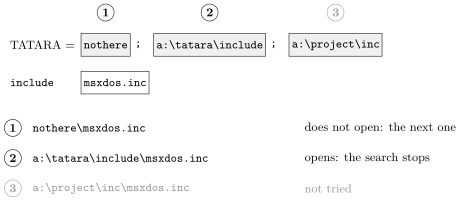
A relative name with a directory in it, such as sub\mid.inc, is joined to each directory of the variable in the same way as a plain name. Figure I.1 shows how a value and a name become the names that TATARA tries.
I.4 TANREN
TANREN looks for an object file in three places too (section 23.1, figure 23.1):
- the directory of the link file that names it, if it was named in one;
- the current directory;
- each directory named in TANREN, from left to right.
As with TATARA, the variable is used only when the file is in neither of the first two places, never for an absolute name, and is read once for the whole link.
Without /O:, the output file goes into the directory where the first object file was found. If that object file came from a directory of TANREN, the output file goes there too (section 23.4); name the output file with /O: to put it somewhere else.
I.5 The rules both share
TATARA and TANREN are read in the same way. Each directory of the value, followed by \ and the name, is tried in turn, and the first one that opens is used. Table I.1 gives the details.
|
|
|
|
What |
What happens |
|
|
|
|
Separator |
|
|
Order |
From left to right. The first directory where the file opens is used, and the rest are not tried. |
|
A \ at the end |
Not needed, and does no harm: a:\inc and a:\inc\ are the same. |
|
A drive alone |
b: means the current directory of drive B:, as it does in MSX-DOS2. |
|
A relative directory |
Relative to the current directory, not to the source file or the link file: inc is INC under the directory the tool was started in. |
|
A root-relative directory |
\project\inc is on the current drive. |
|
A directory that does not exist |
Passed over without a message; the next one is tried. |
|
An empty entry |
;; or a ; at the start is the current directory, which has already been tried, so it does no harm. |
|
Spaces |
Part of the directory name. In a:\inc; a:\lib the second directory starts with a space, so it does not exist and is passed over. Do not put a space after the ;. |
|
Upper and lower case |
The same, as everywhere in MSX-DOS. |
|
A long directory |
The directory, \, and the name together must fit in 63 characters. A directory that is too long for the name is passed over without a message, even if the file is there. |
|
A long value |
At most 127 characters. A longer value stops the tool with the TATARA variable is too long. or the TANREN variable is too long. rather than letting it search a shortened list. SET cannot make a value that long, because its own command line is limited to 127 characters, so the message appears only if another program set the variable. |
|
No variable |
Only the first two places are searched. |
|
|
|
|
|
|
|
|
|
|
|
|
|
|
|
When a file is not found anywhere, the message names the file as it was written, not the names that were tried:
A:\>tatara which.as
...
ERROR: cannot open ENVT.INC
    included from WHICH.AS(2)
SET on its own shows what the variable holds, which is the first thing to check when a file that exists is not found.
On a Japanese MSX, \ appears as ¥. It is the same character.