Chapter 2
How an assembler and a linker work
This chapter explains what TATARA and TANREN each do, and why a program is built in two steps rather than one. It introduces the words that the rest of the manual uses, and follows one small program from the source files you write to the program you run.
2.1 Two steps
A program starts as one or more source files: text files that you write with an editor, in assembly language. Tatara’s source files are normally named with the extension .AS.
TATARA reads a source file and writes an object file, with the extension .TRO. An object file holds the program’s machine code, but it is not yet a program that can be run.
TANREN reads one or more object files and writes the finished program file. For MSX-DOS2 this is a file with the extension .COM, which you run by typing its name at the MSX-DOS2 prompt. Figure 2.1 shows the two steps.

In the terms of chapter 1, the source files are the raw materials, the object files are the raw steel, and the program is the finished blade. The rest of this chapter explains what happens in each step, and why the raw steel is worth having.
2.2 What the assembler does
A source file is a list of lines. Most of them are instructions for the Z80, written as short words that a person can read, such as ld c,_STROUT. The Z80 cannot read words. What it reads are bytes: numbers from 0 to 255, stored one after another in memory, which together are the program’s machine code. Turning each line of a source file into its bytes is called assembling.
Table 2.1 shows three lines and the bytes TATARA assembles them into. The bytes are written in hexadecimal.
| Line | Bytes |
| ld c,_STROUT | 0E 09 |
| call BDOS | CD 05 00 |
| ret | C9 |
The first byte of each line says which instruction it is. The bytes after it are the instruction’s operand, if it has one. An address takes two bytes, and the Z80 stores the low byte first, so the address 0005h is stored as 05 followed by 00.
_STROUT and BDOS are not instructions. They are names for the numbers 09h and 0005h, and they are defined in MSXDOS.INC, one of the include files that come with Tatara (chapter 14). A program that includes that file can use the names, and the assembler replaces each name with its number. A name that stands for a number in this way is called a symbol.
A program also needs names for places in itself: the start of a loop, or a message to be printed. A label is such a name. It is written at the start of a line, followed by a colon, as in msg1:, and it stands for the address of the first byte that line produces: the number of the memory location where that byte will be. A label is a symbol too.
To know what each label stands for, the assembler counts the bytes as it goes. If a program’s first line produces three bytes and its second line produces three more, the third line starts six bytes after the first.
Note. This manual assumes that you know what a byte, a hexadecimal number and a memory address are. The book or course you learn Z80 programming from explains them.
2.3 What the assembler cannot know
Counting bytes tells the assembler how far each label is from the start of the program. There are two things that a single source file cannot tell it.
- Where the program will be in memory. The assembler knows that a label is, say, 17 bytes after the start of the code, but it does not know at which address the code will start. That is decided later, when all the parts of the program are put together. An address that depends on where the code is placed is relocatable.
- Where things in other files are. A program can be split over several source files, and a line in one of them can call a routine that is written in another. TATARA assembles one file at a time, so it cannot know the address of a name that is defined in a different file.
TATARA therefore does all the work it can, and writes down what it could not finish. Where an address is still unknown, it leaves a hole in the machine code, and it records what belongs in the hole. The result is the object file: machine code with holes in it, and a note for each hole. This is the raw steel.
The code of one source file, as it is in its object file, is called a module. A module can offer some of its symbols to other modules, and it can use symbols that other modules offer:
- A public symbol is one that a module defines and makes available to other modules. It is declared with the PUBLIC directive.
- An external symbol is one that a module uses but that another module defines. It is declared with the EXTRN directive.
A directive is a line that gives an instruction to the assembler rather than to the Z80; it produces no machine code of its own.
2.4 What the linker does
TANREN reads one or more object files and does three things.
- It places the modules one after another in memory, starting at address 0100h, which is where MSX-DOS2 loads a program and starts it.1
- It fills every hole. For a relocatable address, it adds the address where the module was placed to the value that TATARA left in the hole. For an external symbol, it finds the module that declared the symbol public and writes the symbol’s address into the hole. Filling the holes is called relocation.
- It writes the program file: the finished bytes, in a file that MSX-DOS2 can load and run.2
The whole job is called linking. It is the forging that turns the raw steel into a blade.
2.5 A worked example
The example TWOMOD is a program in two modules. It is one of the examples that come with Tatara; chapter 4 builds it, and chapter 28 returns to it. The first module, MAIN.AS, prints two lines by calling a routine named putstr, which it declares external:
; MAIN.AS - one of two modules.
;
; It knows that putstr exists. It does not know where putstr is, and
; it does not need to: EXTRN says the name is somebody else's, and the
; linker fills the address in.

                extrn   putstr          ; defined in PUTSTR.AS

                include msxdos.inc      ; BDOS and _TERM0

                cseg

start:          ld      hl,msg1
                call    putstr
                ld      hl,msg2
                call    putstr
                ld      c,_TERM0
                jp      BDOS

msg1:           db      "Two modules, one program.",13,10,0
msg2:           db      "The linker joined them.",13,10,0

                end     start
The second module, PUTSTR.AS, defines putstr and declares it public:
; PUTSTR.AS - the other module.
;
; PUBLIC is what makes the name visible outside this file. Without it
; the name would still assemble here and the link of MAIN.AS would
; stop with an undefined symbol - which is worth trying once.

                public  putstr

                include msxdos.inc      ; BDOS, _CONOUT and "system"

                cseg

; putstr - print a string.
;
;   HL is pushed around the BDOS call because MSX-DOS promises nothing
;   about the registers it hands back.
;
; Input:        HL -> the string, ending in a zero byte
; Output:       it is printed
; Modifies:     AF, BC, DE, HL

putstr:         ld      a,(hl)
                or      a
                ret     z
                push    hl
                ld      e,a
                system  _CONOUT
                pop     hl
                inc     hl
                jr      putstr

                end
Both modules include MSXDOS.INC. The INCLUDE line reads that file as if its lines were written at that point, and it produces no bytes of its own. PUTSTR.AS uses system _CONOUT: system is a macro defined in MSXDOS.INC, a single name that stands for a group of lines. Here it stands for ld c,_CONOUT followed by call BDOS. Chapter 16 explains macros.
2.5.1 What TATARA writes for MAIN.AS
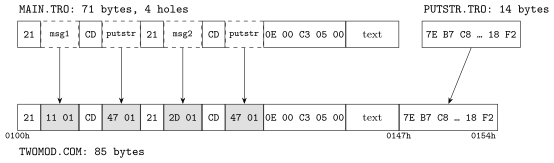
MAIN.AS assembles to 71 bytes of machine code with four holes in it, as table 2.2 shows. The offset is the number of bytes from the start of the module.
| Offset | Line | Bytes | Hole |
| 0 | ld hl,msg1 | 21 11 00 | relocatable: msg1, 17 bytes in |
| 3 | call putstr | CD 00 00 | external: putstr |
| 6 | ld hl,msg2 | 21 2D 00 | relocatable: msg2, 45 bytes in |
| 9 | call putstr | CD 00 00 | external: putstr |
| 12 | ld c,_TERM0 | 0E 00 | none |
| 14 | jp BDOS | C3 05 00 | none: BDOS is always 0005h |
| 17 | msg1: db ... | 28 bytes of text | none |
| 45 | msg2: db ... | 26 bytes of text | none |
A relocatable hole holds the label’s offset: 11h is 17, the offset of msg1. An external hole holds zero, because the assembler knows nothing about putstr except its name. The jp BDOS at offset 14 is not a hole: BDOS is the fixed address 0005h, the same wherever the program is placed.
2.5.2 What TATARA writes for PUTSTR.AS
PUTSTR.AS assembles to 14 bytes, and it has no holes at all. The call BDOS inside system _CONOUT calls a fixed address. The jr putstr at its end does not hold an address either: it holds a distance, “jump back 14 bytes”, which is the same wherever the code is placed. The module has one public symbol, putstr, at offset 0.
2.5.3 What TANREN does
TANREN places MAIN first, because it is named first, and PUTSTR straight after it. Then it fills the four holes, as table 2.3 shows.
| MAIN placed at | 0100h (71 bytes, to 0146h) |
| PUTSTR placed at | 0147h (14 bytes, to 0154h) |
| so putstr is | 0147h |
| hole at 0101h | 0011h + 0100h = 0111h, the address of msg1 |
| hole at 0104h | 0147h, the address of putstr |
| hole at 0107h | 002Dh + 0100h = 012Dh, the address of msg2 |
| hole at 010Ah | 0147h, the address of putstr |
The result is TWOMOD.COM, 85 bytes long, which MSX-DOS2 loads at 0100h. Figure 2.2 shows the two object files and the program they become.
2.6 Code and data: segments
A program holds two kinds of thing: instructions, and the data they work on. Tatara lets you keep them apart, in two segments. The code segment is started with the CSEG directive, and the data segment with DSEG.
When TANREN places the modules, it puts the code segments of all the modules first, one after another, and the data segments after them. In the finished program each kind is therefore in one piece.
TWOMOD keeps its two messages in the code segment, which is fine for a program this small, and its data segment is empty. Chapter 10 explains segments in full, including segments with names of their own and data areas that different parts of a program can share.
2.7 Why two steps are worth it
Building a program in two steps takes one more command than building it in one, and it gives four things in return.
- Reuse.
-
A module such as PUTSTR can be linked into any number of programs without being assembled again.
- Size.
-
A large program is easier to work on when it is split over several files, and only the file that changed needs to be assembled again.
- Collaboration.
-
A programmer can write a library of routines, assemble it, and make its object files available. Other programmers link it into their own programs without copying its code into theirs, and without needing its source files at all: the object file is enough.
- Choice of output.
-
Where the program is placed is decided only at the end, so the same object files can become a program for MSX-DOS2, a binary for MSX-BASIC’s BLOAD, or a ROM cartridge (chapter 26).
2.8 The words in this chapter
Table 2.4 lists the terms this chapter has introduced. The glossary (appendix L) lists them with every other term in the manual.
| Term | Meaning |
| source file | the text file you write, in assembly language |
| machine code | the bytes the Z80 reads and runs |
| assembling | turning source lines into machine code |
| symbol | a name that stands for a number |
| label | a symbol that stands for an address in the program |
| address | the number of a memory location |
| relocatable | an address that depends on where the code is placed |
| hole | a place in the machine code where an address is still unknown |
| object file | machine code with holes, written by TATARA |
| module | the code of one source file, in its object file |
| public symbol | a symbol a module offers to other modules |
| external symbol | a symbol a module uses but another module defines |
| relocation | filling the holes |
| linking | placing the modules, filling the holes, and writing the program |
| program file | the finished program, written by TANREN |
| segment | an area of the program for one kind of content: code or data |
1This is the default, because TANREN builds MSX-DOS2 programs unless it is told otherwise. It can be given another start address, to build a program that runs somewhere else in memory, such as a ROM cartridge or a binary for MSX-BASIC’s BLOAD (chapter 24).
2Again, this is the default. TANREN can also write a binary for MSX-BASIC’s BLOAD, or the image of a ROM cartridge (chapter 26).