Chapter 31
Long symbol names and case-sensitive names
The name of a symbol in TATARA can be as long as it needs to be, and every character of it counts; with /C, capitals and small letters count too (chapter 7). This chapter builds NAMES, the example in A:\TATARA\EXAMPLES\NAMES, which shows both in one source. It then takes long symbol names and /C beyond one source, to a program of several modules, and /C to the names of macros.
31.1 The example
NAMES makes no program. Its BUILD.BAT assembles one source twice, without /C and with it, and keeps the symbol table of each run in a text file. The two files are the result: they show which names TATARA took as one, and which as two.
31.2 The source
; NAMES.AS - names as long as you like, in either case.
;
; A SYMBOL MAY BE 255 CHARACTERS AND ALL OF THEM COUNT. M80 keeps the
; first six, which is why so much CP/M-era assembly is written in
; abbreviations. The two names below differ only in their last five
; characters and are two different symbols here. 255 is the limit, and
; the test suite has a 240-character name in it; these are 48, which is
; as long as a line can carry and still be read on an MSX screen.

first_pass_symbol_table_high_water_mark_in_bytes        defl    1024
first_pass_symbol_table_high_water_mark_in_words        defl    512

; THE SAME SIX LETTERS IN TWO CASES. Without /C they are ONE symbol,
; and the second line changes its value. With /C they are TWO, with
; values 1 and 2. The symbol table of each run says which - and DEFL
; is used rather than EQU because a redefinition is legal, so the
; source assembles cleanly in both modes.

Counter         defl    1
counter         defl    2

; DIRECTIVES, MNEMONICS AND REGISTER NAMES ARE CASE-INSENSITIVE IN
; BOTH MODES. /C is about the names you choose, not the ones the Z80
; already has.

                cseg

start:          LD      A,1
                ld      b,a
                DB      Counter
                db      counter
                ret

                end     start
The source has three parts:
- Two long symbol names, of 48 characters each, that differ only in their last five characters, bytes and words. They are two different names, with their own values, 1024 and 512.
- Counter and counter, the same seven letters in two cases, each given a value with DEFL. DEFL allows a name to be given a new value (section 12.4), so the source assembles whether the two are one name or two.
- A few instructions, some in capitals and some not, that use both. Instructions, registers and directives can be written in either case, with or without /C.
31.3 Building it
rem BUILD.BAT - EXAMPLE: NAMES
rem
rem One source, assembled twice, and the two symbol tables are the
rem answer.
rem
rem   /S   print the symbol table when the assembly ends
rem   /P   assemble to the screen, producing no object file
rem   /C   make symbol and macro names case-SENSITIVE
rem
rem Without /C, Counter and counter are one symbol whose value ends up
rem 2, and the table has one entry. With /C they are two symbols, 1
rem and 2, and the table has both. The default is M80s behaviour.
rem
rem The two long names are 48 characters each and differ in the last
rem five. M80 would have made them one symbol.

echo === Case-insensitive, which is the default
tatara /q /p /s names.as > insens.txt

echo === Case-sensitive
tatara /q /p /c /s names.as > sens.txt

echo === Done. Compare INSENS.TXT with SENS.TXT.
/P prints the listing on the screen, and /S the symbol table after it (section 5.5, chapter 19). No object file is named on the command line, so none is written. Each > sends what TATARA prints to a file. The example needs no include file, so the batch file does not set TATARA.
A:\TATARA\EXAMPLES\NAMES>build
=== Case-insensitive, which is the default
=== Case-sensitive
=== Done. Compare INSENS.TXT with SENS.TXT.
31.4 Reading the two files
Each file starts with the listing: a page heading and the source as it was written. Without /L, the listing has no addresses and no bytes. The symbol table follows it. This is the whole table in INSENS.TXT:
ASEG - absolute

0002h  var        Counter
0200h  var        first_pass_symbol_table_high_water_mark_in_words
0400h  var        first_pass_symbol_table_high_water_mark_in_bytes

CSEG - default code segment, 0006h bytes

0000h             start

DSEG - default data segment, 0000h bytes

(no symbols)
and the one in SENS.TXT:
ASEG - absolute

0001h  var        Counter
0002h  var        counter
0200h  var        first_pass_symbol_table_high_water_mark_in_words
0400h  var        first_pass_symbol_table_high_water_mark_in_bytes

CSEG - default code segment, 0006h bytes

0000h             start

DSEG - default data segment, 0000h bytes

(no symbols)
The two long symbol names are two symbols in both files: every character of a name counts, with or without /C. The files differ only in Counter, as figure 31.1 shows:
- Without /C, Counter and counter are one name. counter defl 2 gives it a new value, 2, and the table has one line for it, spelled as it was first written.
- With /C, they are two names, with the values 1 and 2.
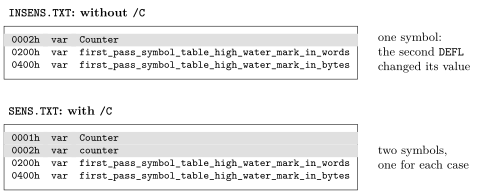
The code is the same six bytes in both runs. Without /C, db Counter and db counter are both 2; with it, 1 and 2.
31.5 Long symbol names across modules
A name keeps its full length in the object file (section 7.2), and TANREN matches the whole of it. LONGUSE.AS uses the two long symbol names of NAMES.AS as external names:
; LONGUSE.AS - uses two long names from another module.
                extrn   first_pass_symbol_table_high_water_mark_in_bytes
                extrn   first_pass_symbol_table_high_water_mark_in_words
                cseg
                ld      hl,first_pass_symbol_table_high_water_mark_in_bytes
                ld      de,first_pass_symbol_table_high_water_mark_in_words
                ret
                end
LONGDEF1.AS defines only the first of them:
; LONGDEF1.AS - defines only the first of the two.
                public  first_pass_symbol_table_high_water_mark_in_bytes
                cseg
first_pass_symbol_table_high_water_mark_in_bytes:
                nop
                end
The two names share their first 43 characters, but TANREN does not take one for the other. The one that is missing is named in full:
A:\TATARA\EXAMPLES\NAMES>tatara /q longuse.as longuse.tro
A:\TATARA\EXAMPLES\NAMES>tatara /q longdef1.as longdef1.tro
A:\TATARA\EXAMPLES\NAMES>tanren longuse longdef1 /o:l1.com
...
Never defined:
  first_pass_symbol_table_high_water_mark_in_words
ERROR: the symbols above were never defined.
LONGDEF2.AS defines both, each as a label with a nop:
; LONGDEF2.AS - defines both.
                public  first_pass_symbol_table_high_water_mark_in_bytes
                public  first_pass_symbol_table_high_water_mark_in_words
                cseg
first_pass_symbol_table_high_water_mark_in_bytes:
                nop
first_pass_symbol_table_high_water_mark_in_words:
                nop
                end
A:\TATARA\EXAMPLES\NAMES>tatara /q longdef2.as longdef2.tro
A:\TATARA\EXAMPLES\NAMES>tanren /m longuse longdef2 /o:l2.com
...
Symbols:
  DR 0108 first_pass_symbol_table_high_water_mark_in_words
  DR 0107 first_pass_symbol_table_high_water_mark_in_bytes
2 modules, 15 records, ends at EOF.
Wrote L2.COM, 0100-0108 (9 bytes).
Both names are matched, each at its own address. A program can therefore name its routines and variables for what they are, as print_string or keyboard_buffer_length, across all its modules. The only limits are 255 characters and the length of a line (section 7.2).
31.6 Macro names and /C
/C applies to the names of macros as well as to symbols (section 16.8). MACCASE.AS defines a macro called Twice, and uses it once in each case:
; MACCASE.AS - a macro defined as Twice and used as twice.
Twice           macro
                nop
                nop
                endm
                cseg
                Twice
                twice
                end
Without /C, both lines are the macro, and each becomes two nops:
A:\TATARA\EXAMPLES\NAMES>tatara /p /s maccase.as
...
                cseg
                Twice
                nop
                nop
                twice
                nop
                nop
                end
...
CSEG - default code segment, 0004h bytes
With /C, twice is not the name of the macro, nor of any instruction or directive:
A:\TATARA\EXAMPLES\NAMES>tatara /p /c /s maccase.as
...
MACCASE.AS(8): ERROR: not a directive, a macro or an instruction.
A source written for /C has to use each macro in exactly the case of its definition, including the macros of the include files, such as system.