Chapter 35
Building TATARA and TANREN from their own sources
TATARA and TANREN are written in the source language that TATARA assembles, and they are built on an MSX, by TATARA and TANREN: each release is made by the release before it. This chapter shows where the sources are and how they are laid out, goes through the batch file that builds the two tools, runs it, and then builds the tools a second time, with the tools that the first build made.
How the tools work inside is not covered here. The comments in the sources describe each module.
35.1 The sources
The archive that chapter 3 installs holds only the two programs, the include files, README.TXT and LICENSE. The sources are in a public repository, at https://github.com/javilm/tatara, which can be downloaded as a ZIP file and copied to the MSX.
Figure 35.1 shows the parts of the tree that the build uses. This chapter puts it in A:\SRC\TATARA; any other place works, as long as the directories inside it stay as they are.
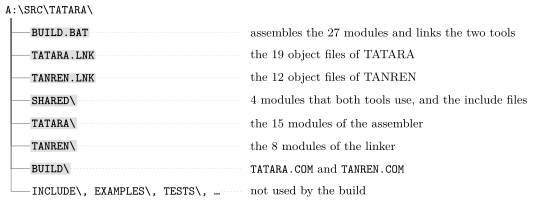
The repository holds more than the build needs: the include files of the distribution, the examples of this manual, and the test suites of the two tools. BUILD\ holds the programs of the current release, and the build writes its own over them.
Note. The sources take about 700 KB, and the build needs space for its object files and its two programs as well. That is more than a 720 KB floppy disk holds: build the tools on a hard disk, or on a CF or SD card.
The build is run by the tools that are already installed, so A:\TATARA\BIN, or wherever TATARA.COM and TANREN.COM are, must be in PATH (section 3.4).
35.2 BUILD.BAT
BUILD.BAT assembles the 27 modules and links the two tools:
rem BUILD.BAT - assemble and link both tools, with Tatara.

rem SILENCE IS SUCCESS. /Q prints nothing for a module that works and
rem errors print anyway, so anything on the screen between the ===
rem lines is a problem.

set TATARA=shared\


echo === Assembling TATARA modules...
tatara /q tatara\tatara.as tatara.tro
tatara /q tatara\cmdline.as cmdline.tro
tatara /q tatara\srcline.as srcline.tro
tatara /q tatara\fields.as fields.tro
tatara /q tatara\dirtab.as dirtab.tro
tatara /q tatara\macros.as macros.tro
tatara /q tatara\errs.as errs.tro
tatara /q tatara\expand.as expand.tro
tatara /q tatara\cond.as cond.tro
tatara /q tatara\expr.as expr.tro
tatara /q tatara\symtab.as symtab.tro
tatara /q tatara\optab.as optab.tro
tatara /q tatara\insn.as insn.tro
tatara /q tatara\emit.as emit.tro
tatara /q tatara\objout.as objout.tro

echo === Assembling TANREN modules...
tatara /q tanren\tanren.as tanren.tro
tatara /q tanren\lcmd.as lcmd.tro
tatara /q tanren\lobj.as lobj.tro
tatara /q tanren\lseg.as lseg.tro
tatara /q tanren\lsym.as lsym.tro
tatara /q tanren\lerrs.as lerrs.tro
tatara /q tanren\limg.as limg.tro
tatara /q tanren\arglist.as arglist.tro

echo === Assembling shared modules...
tatara /q shared\msxdos.as msxdos.tro
tatara /q shared\strutil.as strutil.tro
tatara /q shared\alloc.as alloc.tro
tatara /q shared\hash.as hash.tro

echo === Linking TATARA and TANREN binaries
tanren /o:build\tatara.com @tatara.lnk
tanren /o:build\tanren.com @tanren.lnk

echo === Cleaning up
del *.tro
It is run from the root of the tree, and does four things.
- It sets TATARA to shared\. The modules include their own .INC files, which are beside them, and rule 1 of the include search finds those. They also include the files in SHARED, such as MSXDOS.INC, and rule 3 finds those through TATARA (section 13.2). The directory is relative, so it is taken from the current directory, and the build works only from the root of the tree (chapter 34).
- It assembles the 27 modules, one tatara line each, in three groups: the 15 modules of the assembler, the 8 of the linker, and the 4 that both use. Each object file is written in the root of the tree.
- It links the two tools, each from a link file (chapter 22), with /O: to write the program into BUILD.
- It deletes the object files.
Every tatara line has /Q. A module that assembles without an error prints nothing, and errors are printed with or without /Q, so the comment at the top says it: anything on the screen between the === lines is a problem. The two links have no /Q, and print TANREN’s summary.
TATARA.LNK names the 19 object files of the assembler, and section 22.2 shows it. TANREN.LNK names the 12 of the linker:
; the linker's own modules.

tanren.tro                              ; the driver
lcmd.tro arglist.tro                    ; the command line
lobj.tro                                ; the object reader
lseg.tro lsym.tro limg.tro              ; tables and the image
lerrs.tro

msxdos.tro strutil.tro alloc.tro hash.tro       ; shared
Both files end with the same line: the four shared modules are assembled once, and linked into both tools. Each file names the driver of its tool first, so that its code is at 0100h, where MSX-DOS starts a .COM program (section 21.1). Figure 35.2 shows how the 27 modules become the two programs.
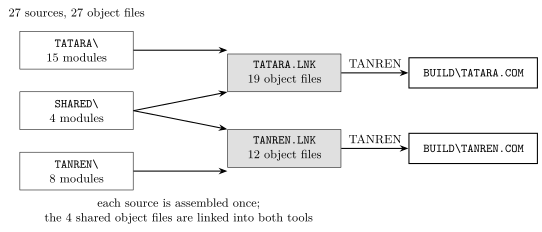
Note. BUILD.BAT does not set TATARA back when it ends, so after a build it holds shared\. Set it to your include directory again before you assemble anything else (section 3.4).
35.3 Running it
Run BUILD.BAT from the root of the tree:
A:\SRC\TATARA>build
=== Assembling TATARA modules...
=== Assembling TANREN modules...
=== Assembling shared modules...
=== Linking TATARA and TANREN binaries
Tatara MSX Linker v1.2.0
Copyright (C) 2026 Javier Lavandeira
https://tatara.tools

19 modules, 1898 records, ends at EOF.
Wrote BUILD\TATARA.COM, 0100-7990 (30865 bytes).
Tatara MSX Linker v1.2.0
Copyright (C) 2026 Javier Lavandeira
https://tatara.tools

12 modules, 766 records, ends at EOF.
Wrote BUILD\TANREN.COM, 0100-3501 (13314 bytes).
=== Cleaning up
Nothing is printed between the === lines of the assembly, so all 27 modules assembled without an error. The Wrote lines have no entry part, because no module of either tool names an address on its END line; each program starts at 0100h, with the code of its first module (section 21.4).
How long the build takes depends on the machine, and on the interface and the card that the files are on. As a guide, building from a CF or SD card in an IDE interface, it takes about 4 minutes on an MSX turbo R (a Panasonic FS-A1GT), and about 23 minutes on an MSX2+ (a Sony HB-F1XV). The turbo R is faster because of its R800 processor.
An emulator such as openMSX can also run the emulated MSX as fast as the computer it runs on allows, instead of at the speed of a real MSX. The build then takes much less time: about 14 seconds on a recent Mac.
/V checks that the new programs run:
A:\SRC\TATARA>build\tatara /v
Tatara MSX Macro-Assembler v1.2.0
Copyright (C) 2026 Javier Lavandeira
https://tatara.tools


A:\SRC\TATARA>build\tanren /v
Tatara MSX Linker v1.2.0
Copyright (C) 2026 Javier Lavandeira
https://tatara.tools


A:\SRC\TATARA>
35.4 Building the tools with themselves
The first build was made by the installed tools. Building again with the tools it made shows that they can build themselves. Keep a copy of them in a directory of their own, STAGE1, and put that directory first in PATH, so that MSX-DOS finds the new TATARA.COM and TANREN.COM before the installed ones:
A:\SRC\TATARA>md stage1
A:\SRC\TATARA>copy build\tatara.com stage1
A:\SRC\TATARA>copy build\tanren.com stage1
A:\SRC\TATARA>set path=a:\src\tatara\stage1;%path%
PATH names the directory with its full path, so that the tools are found from any directory. %path% keeps the directories that PATH already held, after the new one.
Then run BUILD.BAT again. It prints the same lines as the first time, and writes the two programs into BUILD once more, over the first ones (figure 35.3).
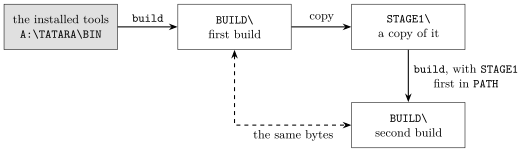
The programs of the second build are the same as those in STAGE1, byte for byte: the tools that the first build made make themselves again, exactly. If you keep a copy of the programs that BUILD held before the first build, the programs of the release, they are the same as well.
MSX-DOS has no command that compares two files. To compare them, copy them to another computer and compare them there.
When you have finished, take STAGE1 out of PATH again, or start a new session, so that the installed tools are the ones that run.