Chapter 1
Introduction
1.1 What Tatara and Tanren are
Tatara and Tanren are the two tools you need to turn a program written in Z80 assembly language into a program that runs on an MSX.
Tatara is an assembler. It reads the program you have written, a text file of instructions such as ld a,5 and call 5, and turns it into the machine code that the Z80 processor understands.
Tanren is a linker. It takes the machine code that Tatara has produced, from one file or from several, joins it together, decides where in memory each part will go, and writes a finished program that you can run.
Why there are two tools and not one, and what each of them does in detail, is the subject of chapter 2.
Both tools run on the MSX itself, under MSX-DOS2 or Nextor. You write your program, assemble it, link it and run it on the same machine, with no other computer involved. They run in the same way in an MSX emulator.
Tatara reads the assembly language of Microsoft’s MACRO-80, the assembler that was used to write much of the software of the CP/M and early MSX years. Programs and books written for MACRO-80 can therefore be used with Tatara. Appendix J lists where the two differ.
1.2 Where the names come from
The two names come from the traditional way of making a Japanese sword.
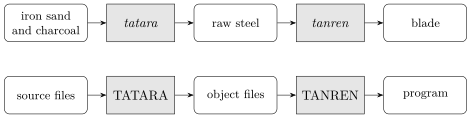
A tatara (たたら) is a clay furnace. Iron sand and charcoal are loaded into it and burnt, over about three days, until they have turned into raw steel: a rough block of metal, strong but shapeless, and not yet a blade.
Tanren (鍛錬) is the forging that follows. The smith heats the raw steel, hammers it and folds it, again and again, until it becomes a finished blade. In everyday Japanese the same word also means training and discipline.
The two tools do the same two jobs for a program, as figure 1.1 shows. The source files you write are the raw materials. TATARA turns them into object files: real machine code, but not yet a program you can run, in the same way that raw steel is not yet a sword. TANREN takes one or more object files and forges them into the finished program. Chapter 2 builds on this picture.
1.3 What they can do
This is a short list, for a first reading. Each point is explained in full in the chapter it refers to.
- Long symbol names. The name of a symbol, such as a label, can be up to 255 characters long, so it can say what it is for. Names can also be made case-sensitive with the /C option, so that Count and count are different names (chapter 7).
- Macros and conditional assembly. A piece of code can be written once and used many times, and parts of a program can be included or left out when it is assembled (chapters 15 to 17).
- Segments. Code and data can be kept in separate areas of the program, called segments, which can be given names. Data areas that are only needed by one part of a program at a time can share the same memory (chapter 10).
- Programs in many files and directories. A file that is included with the INCLUDE directive is looked for in three places, and the TATARA and TANREN environment variables say where else to look (chapters 13 and 23).
- Ready-made names. Tatara comes with include files that name the MSX-DOS2 functions and error codes, the BIOS entry points, the system work area and much more, 904 names in all, so that a program can write _STROUT instead of looking up that it is 09h (chapter 14).
- Large programs. Both tools keep their tables, and Tanren keeps the program it is building, in the memory mapper. The size of the program you can build is limited by how much memory your MSX has, not by the memory MSX-DOS leaves free (chapter 26 and appendix G).
- Instructions for the linker in a file. MSX-DOS cuts off a command line at 127 characters, which a program built from many files soon reaches. Tanren can read the list of files, and everything else it would be told on the command line, from a text file instead (chapter 22).
- Errors that point to your line. When there is an error, the message names the file and the line you wrote, even when the line came from a macro or from an included file (chapter 20).
- Several kinds of output. Tanren can write a program for MSX-DOS, a binary for MSX-BASIC’s BLOAD, an image of the code for any address, or the image of a ROM cartridge (chapter 26).
- R800 instructions. Tatara also assembles MULUB and MULUW, the multiplication instructions of the R800 processor in the MSX turbo R (chapter 9).
- Undocumented instructions. Tatara assembles the undocumented Z80 instructions that MSX programs use, such as SLL and those that use IXH and IXL (section 9.5).
1.4 What you need
To use Tatara and Tanren you need:
- An MSX running MSX-DOS2 or Nextor. Under MSX-DOS1 both programs stop at once with a message saying so.
- A memory mapper. MSX-DOS2 cannot run without one, so if your MSX runs MSX-DOS2 it already has one. How much memory the tools need to build a program of a given size is described in appendix G.
- The two programs, TATARA.COM and TANREN.COM, which can be downloaded from https://tatara.tools/download. Chapter 3 explains how to install them.
- An editor that saves plain text files, to write your programs with.
Any MSX2 or later model that can run MSX-DOS2 or Nextor will do, and so will any MSX emulator that can run them.
1.5 What is next
Chapter 2 explains what an assembler and a linker do, and why a program is built in two steps. Chapter 3 installs the tools, and chapter 4 uses them to build and run a first program.